



Featured image: a warm editorial film-production workspace where visual generation sits beside story notes, camera craft and human direction.
Key Takeaways
|
AI film is not defined by whether every frame was generated. It is defined by whether generated and human-made elements work together as one intentional cinematic story. Google Flow's August 27 update added start-and-end-frame control, low-cost 360p drafting and 1080p or 4K output, all of which address real filmmaking problems: continuity, iteration and finishing. Adobe Firefly's August 20 unified generation-and-editing beta connects generation, project media, references and a video timeline in one workspace. Runway Gen-4.5 adds stronger sequenced instructions and camera choreography. The category is moving from clip generation toward production. The seven film rules are story change, character continuity, shot logic, performance, sound, edit rhythm and provenance. A film can survive imperfect pixels more easily than it can survive weak cause-and-effect. Production economics should be measured by approved seconds, not generated seconds. Drafts, failed shots, audio, upscaling, continuity fixes and edit time are part of the real cost. |
|---|
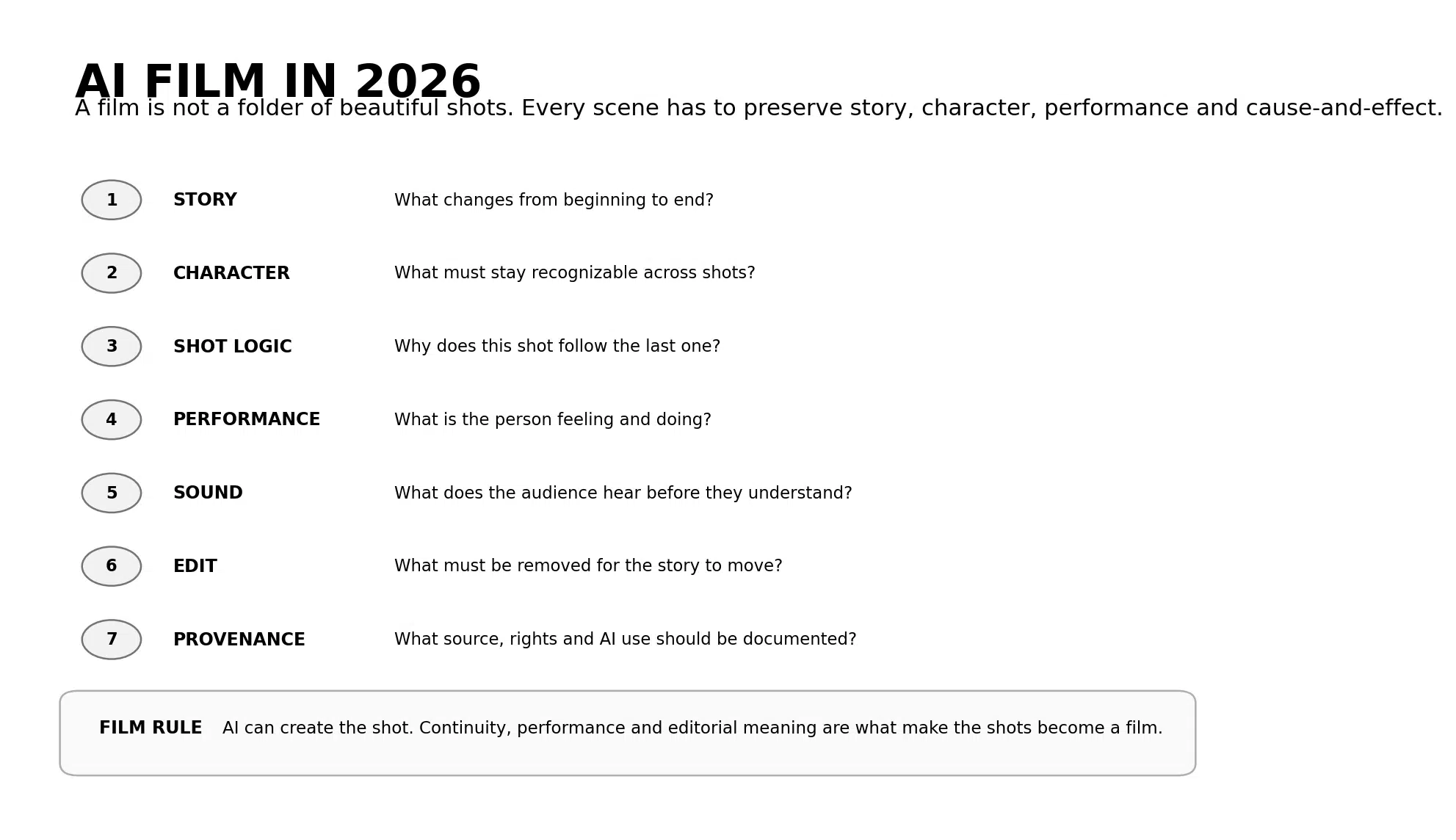

Figure 1. Seven production rules that separate an AI film from a sequence of attractive generated clips.
AI Filmmaking Is Moving From Generation Toward Filmcraft
The AI filmmaking conversation is changing because the tools are finally being forced to solve problems filmmakers have always had.
On August 27, Google added new production controls to Flow. Start-and-end-frame control gives filmmakers a stronger way to preserve narrative and character continuity between moments. A faster 360p drafting mode makes it cheaper to test composition before committing credits to a final render. Approved clips can then be exported in 1080p or 4K for higher-end finishing.
Five days earlier, Adobe's new Firefly generation-and-editing experience had already pushed in the same direction. The beta workspace combines image and video generation, project assets, reference media, generation history and a video timeline so creators can move between making a shot and assembling a sequence without rebuilding the project somewhere else.
Runway is solving another filmmaking problem. Gen-4.5 supports complex sequenced instructions, detailed camera choreography, timing and atmospheric changes. That makes a prompt behave less like a still-image description and more like a compressed shot direction.
At the same time, AI filmmaking is entering more visible cultural spaces. New AI-specific film awards are drawing established judges and growing recognition, while critics are asking harder questions about originality, rights and what exactly deserves to be celebrated when the production chain includes generative models.
That tension is useful. It pushes the conversation away from 'Can AI make a film?' and toward the better question: 'What still makes something a film when the production tools change?'
The answer is not resolution. It is continuity, performance, point of view, sound, rhythm and meaning.
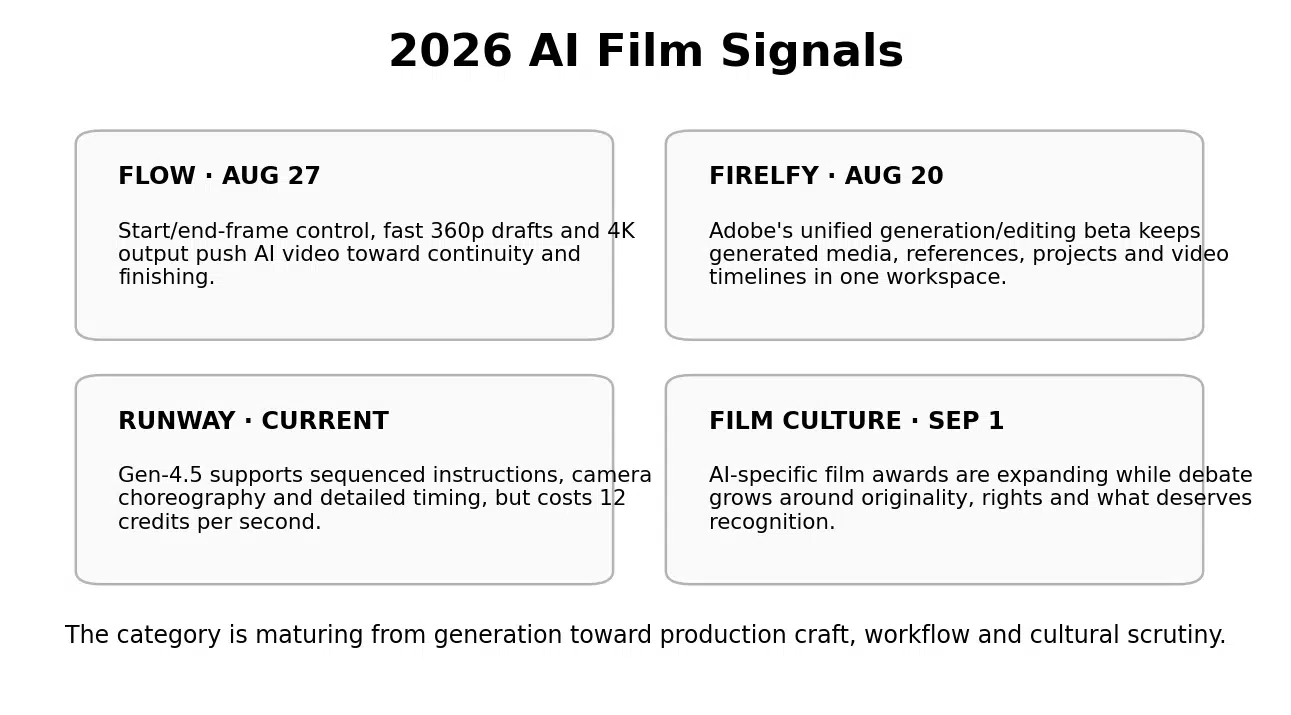

Figure 2. Four signals showing AI filmmaking maturing from generation toward production craft, workflow and scrutiny.
What Is an AI Film?
An AI film is a film in which artificial intelligence materially contributes to one or more stages of development, production or post-production, such as concept visualization, storyboarding, image or video generation, character creation, voice, sound, editing, translation or visual effects.
The presence of AI does not remove the normal requirements of film.
A film still needs a subject, a point of view, a progression of events, performance, sound, visual logic and an edit that turns separate shots into one experience.
This is why an AI-generated clip and an AI film are different objects. A clip can be impressive in isolation. A film has to survive the cut.
AI film vs. AI video
AI video is a broad production category. It includes ads, avatars, product demonstrations, explainers, social clips, training and other generated or AI-assisted formats. AI film implies a cinematic narrative experience where shots, sound and time work together toward a larger meaning.
AI film vs. synthetic video
Synthetic video describes the production method, such as generated people, scenes or voices. AI film describes the finished storytelling form. A film can combine real footage, synthetic environments, generated VFX, cloned dialogue and conventional editing without every element being synthetic.
AI film vs. animation
Animation is a medium and production tradition with its own craft. AI film can be animated, photorealistic, mixed-media, documentary-style or hybrid. The relevant distinction is not live action versus animation. It is whether the sequence has intentional cinematic structure.
The AI Film Production Chain
The biggest workflow mistake is generating too early. A film becomes cheaper when more decisions are made before the expensive shot.
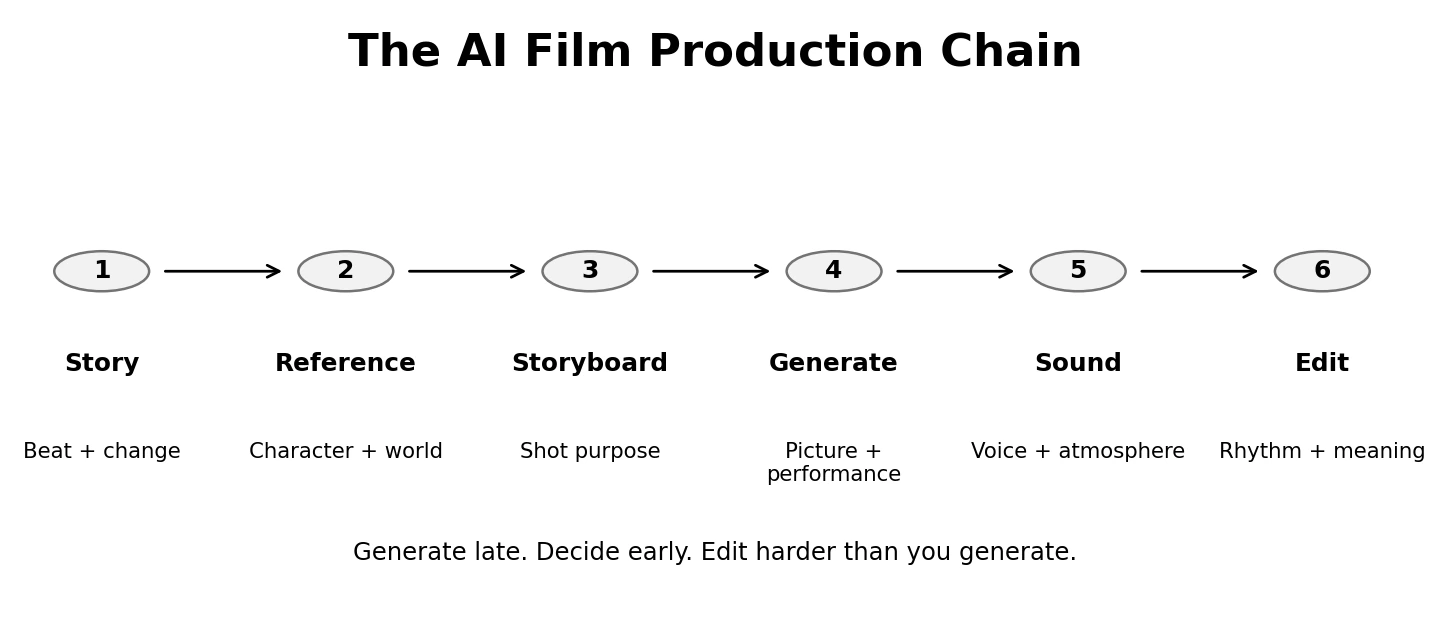

Figure 3. The AI Film Production Chain: story, reference, storyboard, generation, sound and edit.
1. Story: define what changes
Write the character or subject, the starting condition, the tension, the turning point and the ending condition. If nothing meaningful changes, the production has no narrative engine.
2. Reference: build the continuity source
Lock faces, wardrobe, product details, locations, lighting logic, time of day, props, vehicles, textures and any recurring visual motif. Reference images are not decoration. They are the continuity bible the model can see.
3. Storyboard: give every shot a job
For each frame, write what the audience must learn, feel or anticipate. A beautiful establishing shot that communicates nothing may be the first shot to cut.
4. Generate: direct the action, not only the look
Specify subject action, camera behavior, timing, environment response and emotional performance. The model needs to know what changes inside the shot.
5. Sound: design what the image cannot carry alone
Voice, ambience, room tone, footsteps, traffic, wind, silence and music all create continuity. Generated pictures without coherent sound often feel like a demo reel because nothing acoustically connects the world.
6. Edit: create meaning between shots
The edit decides whether the audience understands cause and effect. Cut late when a reaction matters. Cut early when the audience already understands. Remove any shot whose beauty slows the story.
|
The production rule Generate late. Decide early. Edit harder than you generate. |
|---|
7 Production Rules for an AI Film That Feels Like Cinema
1. Give the film one change to track
A story becomes easier to direct when one change anchors the sequence. A founder goes from overlooked to understood. A product moves from raw material to finished object. A character changes a decision. A place transforms over one night. The change gives every shot a relationship to the ending.
2. Lock character continuity before chasing realism
A perfectly realistic face that changes identity between shots destroys belief. Lock age, facial structure, hair, body proportions, wardrobe, accessories and performance language. Test medium shots, profiles and different lighting before beginning the full sequence.
3. Write shot logic, not a shot wishlist
A shot list is not a collection of cool angles. Ask why shot B follows shot A. Does it reveal information? Change emotional distance? Shift point of view? Show the consequence of an action? The cut needs a reason.
4. Direct performance as behavior
Models respond better when emotion becomes physical. Instead of 'she is anxious,' describe the hand staying on the coffee cup, the glance toward the door, the breath held before speaking. Performance becomes visible action.
5. Build sound before the final picture lock
Sound can expose continuity problems early. A room with one acoustic identity feels like one place even when shots were generated separately. Draft ambience, dialogue rhythm and key sound events while visual shots are still flexible.
6. Use draft resolution for decisions, high resolution for approval
Google Flow's new 360p drafting workflow is a practical film-production idea: make composition decisions cheaply, then spend credits on the approved version. The same principle applies to every platform. Prototype first. Upscale late.
7. Document provenance and rights
Record which models, source images, voices, performances and licensed materials entered the production. AI-specific awards and broader film culture are increasingly debating originality and rights. Provenance should be part of the production folder, not an emergency exercise after release.
3 AI Film Production Environments Worth Comparing
These are not ranked as universal winners. Each represents a different production philosophy: filmmaker-oriented scene building, model-rich generation, and commercial generation plus finishing.
|
Tool |
Best film job |
Current entry pricing |
Current strength |
Cost reality |
Main tradeoff |
|---|---|---|---|---|---|
|
Google Flow |
Storyboards, scene building, references, continuity and iterative filmmaking |
Free access; Google AI Plus $4.99/month |
Veo 3.1, Gemini Omni, agent, references, start/end frames, drafting and high-res output |
Drafting can conserve credits by delaying high-resolution generation |
Best inside Google's creative environment, not a complete professional NLE |
|
Runway |
Complex generated shots, camera choreography and multi-model production |
Free; Standard $15/month or $12 annual |
Gen-4.5 plus multiple third-party models, upscaling, audio and production tools |
Gen-4.5 costs 12 credits per second; model choice changes output economics sharply |
High iteration can consume credits quickly |
|
Adobe Firefly |
Generation that needs to stay close to professional design and editing |
Free daily generations; Standard $9.99/month |
Unified generation/editing beta, Firefly Video Model, partner models, audio, translation and Adobe handoff |
Standard includes 2,000 credits and up to about 20 five-second videos on Adobe's listed plan |
Film-level sequence control may still move into Premiere for detailed finishing |
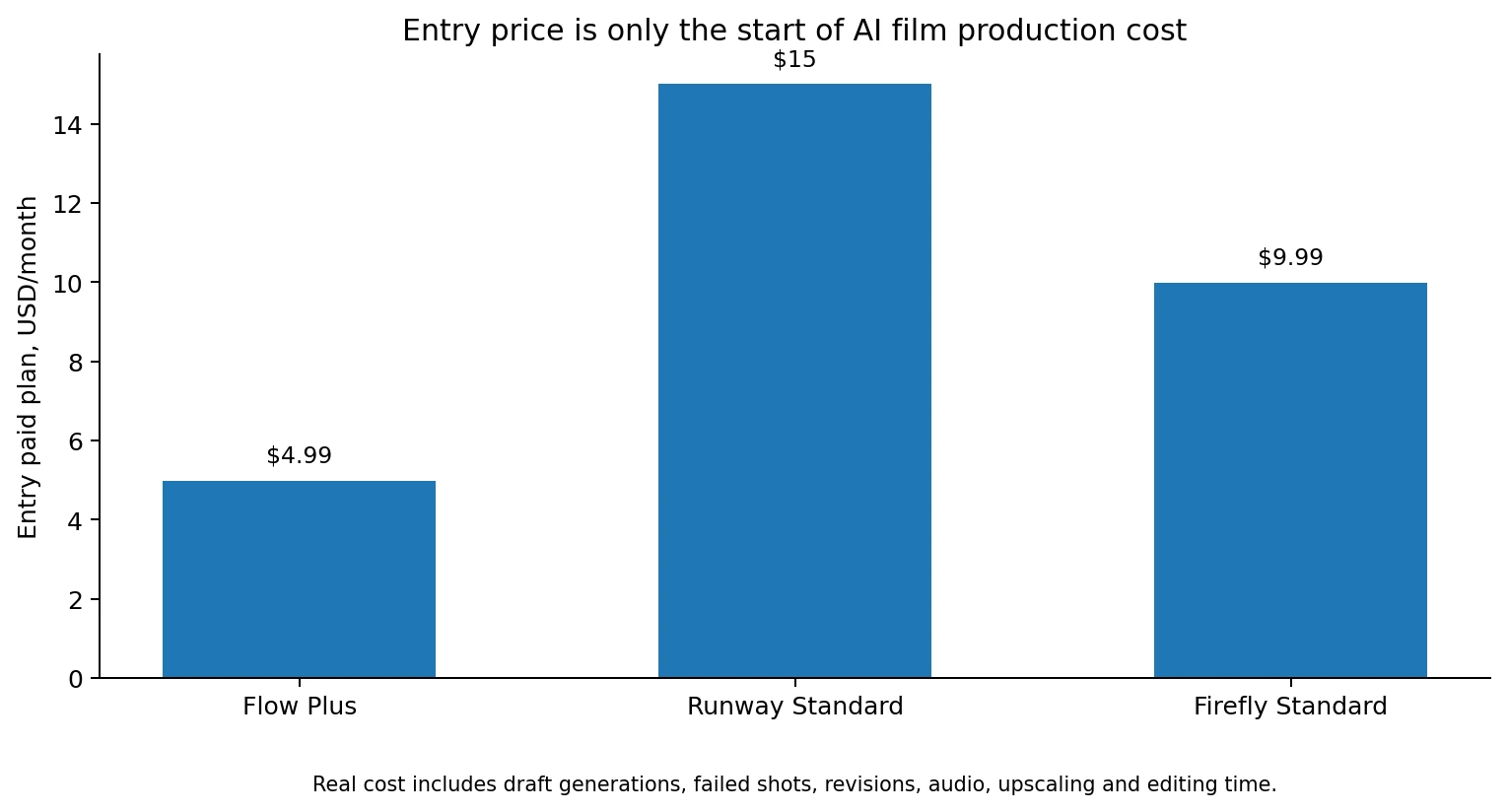

Figure 4. Entry plan pricing is only the visible part of AI film cost. Drafts, failures, audio and editing determine the real production economics.
Google Flow: best when continuity and scene development come first
Google Flow is the strongest fit here when the filmmaker wants to treat AI generation as a scene-building process rather than a one-shot prompt.
Its current Flow product environment combines Veo 3.1, Gemini Omni, visual references, scene building, characters, agents and editing. Google says Veo 3.1 supports native audio, stronger prompt adherence and realism, while the August 27 controls add start-and-end frames plus higher-resolution finishing.
Social Scion assessment: use Flow when the project has recurring characters, locations and scenes that must connect. The storyboard and reference system are more important than the first impressive output.
Runway: best when the difficult shot is the production problem
Runway Gen-4.5 is designed for complex motion and sequenced instructions. Runway's Gen-4.5 documentation says the model can execute camera choreography, detailed scene composition, precise timing and atmospheric changes.
The tradeoff is economics. Gen-4.5 currently costs 12 credits per second. Runway's Standard plan guidance shows how a 625-credit allocation can translate into roughly 20 seconds of Gen-4.5 in a video-heavy production example, depending on what else the project consumes.
Social Scion assessment: use Runway for shots where camera behavior, visual complexity or model variety justifies the credit cost. Do not use the most expensive model for every connective shot.
Adobe Firefly: best when generation must feed a professional finishing workflow
Adobe's August 20 beta matters because it reduces the separation between generated asset and timeline.
The current Firefly generation-and-editing workspace allows creators to generate images and videos, organize project media, reuse outputs as references and edit video content in one environment.
Adobe's current Firefly plans list Standard at $9.99 per month with 2,000 credits and up to 20 five-second videos on the listed configuration. Pro costs $19.99 with 4,000 credits.
Social Scion assessment: Firefly is strongest when the AI-generated shot is only one piece of a broader Adobe-centered production and finishing process.
The Myth: Cinematic AI Film Means Photorealistic AI Film
Photorealism can help. It is not the definition of cinematic.
A stylized film can feel more cinematic than a photorealistic one when it has stronger blocking, performance, sound, lighting logic and edit rhythm.
The obsession with realism can even weaken continuity. A team may regenerate a shot repeatedly for perfect skin detail while accepting that the character's motivation, wardrobe or eyeline no longer matches the previous scene.
Cinema is controlled attention across time.
The audience forgives texture. It notices when cause and effect disappear.
Example: A Small Business AI Film Without a Giant Production
Imagine a local furniture maker whose real advantage is that every dining table begins with one slab selected for the home rather than pulled from a standardized catalog.
The film could follow one object through five stages:
Opening: the unfinished slab alone in morning workshop light.
Selection: hands inspect grain, knots and edge shape beside a sketch of the client's room.
Transformation: short controlled moments of cutting, joining, sanding and oiling.
Delivery: the same grain pattern appears in the finished home, creating visual continuity between workshop and customer life.
Ending: the first meal begins before the camera leaves the room.
AI could create transitions, extend the workshop, visualize an impossible camera move or produce a cinematic delivery shot. The real wood, process, customer context and finished product remain the proof.
That balance is more useful than making an entirely synthetic furniture film because the product truth is exactly what the customer is buying.
How to Plan a 30-Second AI Film in 10 Steps
1. Write one sentence about the change
What is different at the end of the film?
2. Define the human or product truth
What real fact gives the film permission to make this claim?
3. Build the reference board
Lock character, product, location, wardrobe, lighting and color logic.
4. Write six story beats
Each beat should change information, emotion or position.
5. Convert beats into shots
Define framing, action, camera behavior and shot purpose.
6. Draft low-cost frames first
Approve composition and continuity before high-resolution generation.
7. Generate the hardest shots first
Test the scene most likely to break continuity before generating easy connective material.
8. Build provisional sound
Use temporary ambience, dialogue rhythm and music so the edit has an acoustic world.
9. Cut the film before polishing everything
A weak sequence does not become stronger because each individual shot is beautiful.
10. Upscale and finish only the approved cut
Spend credits, cleanup and sound-design time on the shots that survive the edit.
Practical Prompt: Turn a Story Beat Into a Filmable AI Shot
|
Direct behavior, continuity and purpose Create one AI-film shot from the verified story beat below. Do not invent character history, dialogue, product claims, customer results or events outside the supplied story. Return: Verified story beat: [paste beat] |
|---|
When Should You Pay for AI Film Tools?
Pay when the production job has become repeatable enough that a tool removes more cost than it creates.
The project needs recurring characters or locations and the platform's reference controls reduce continuity failures.
Draft-resolution workflows save enough credits that you can test story logic before high-quality rendering.
A high-end model replaces a location, VFX or camera setup that would otherwise be materially more expensive.
A unified generation-and-editing environment removes repeated exports between tools.
The team can estimate approved seconds per month rather than only generated seconds.
Common AI Film Production Mistakes
Generating before the story is stable
More footage creates more editing work when the narrative change is still unclear.
Treating reference images as mood only
The reference system should lock continuity details the audience will notice.
Writing prompts without shot purpose
A detailed prompt can still create a useless shot if nobody knows why the shot is in the film.
Directing emotions instead of behavior
Physical actions create more consistent performances than abstract labels such as sad, intense or inspired.
Ignoring sound until picture lock
Sound can reveal pacing and world-continuity problems before the visuals are expensive to fix.
Using the highest-cost model for every shot
Reserve premium generation for shots where the model's strength creates visible story value.
Upscaling footage that will be cut
Draft the edit first. Finish only shots that survive.
Ignoring provenance
Keep records of source media, permissions, voices, models and licenses as part of the production archive.
FAQ: AI Film in 2026
What is an AI film?
An AI film is a cinematic narrative in which artificial intelligence materially contributes to development, production or post-production, such as storyboarding, generated shots, voices, sound, editing, translation or visual effects.
Can AI make a full film?
AI can now support most production stages, but a coherent film still requires human decisions about story, continuity, performance, sound, editing and rights.
What is the best AI film tool?
Google Flow is strong for scene building and continuity, Runway for complex generated shots and model choice, and Adobe Firefly for generation that needs to stay close to an Adobe finishing workflow.
Is Google Flow free?
Flow currently offers free access, with paid Google AI tiers increasing credits and quality options. Google's August 27 update also added low-resolution drafting and higher-resolution output controls.
How much does Runway Gen-4.5 cost?
Runway currently charges 12 credits per second for Gen-4.5. The total dollar cost depends on the plan, other generation used in the month and how many attempts are required.
How much does Adobe Firefly cost for video?
Firefly Standard currently costs $9.99 per month with 2,000 generative credits. Adobe's listed plan configuration says that can cover up to about 20 five-second videos using the relevant premium generation allocation.
How do I keep an AI character consistent?
Use a locked reference set, consistent identity description, wardrobe and prop rules, stable lighting logic and start/end-frame or reference-image controls where available.
Does an AI film need sound?
A film can intentionally be silent, but sound design is one of the strongest ways to create continuity, space, performance and emotional rhythm across separately generated shots.
Should I generate the whole film before editing?
No. Draft the sequence early, edit rough versions and generate or upscale the final shots only after the story structure works.
Is AI filmmaking copyright-safe?
Rights depend on the models, source material, licenses, jurisdiction and specific use. Keep provenance records and verify the terms of every model and source asset before commercial release.
The 2026 Stance: The Shot Is Becoming Cheap. The Cut Is Becoming Valuable.
AI filmmaking gives creators more possible shots than most projects can use.
That abundance changes where the craft lives.
The scarce decision is no longer only how to get the image. It is which image belongs after the previous one, what performance carries the moment, what the audience hears, what continuity must survive and which beautiful shot should be deleted because the story is stronger without it.
AI expands the production canvas.
Film still begins with a point of view and becomes meaningful in the edit.
Your Business Story Can Become a Film Without Becoming a Tech Demo
A customer truth, product transformation, founder belief or repeated business ritual can already contain the structure of a short film.
Social Scion AI starts with that story, then uses cinematic and AI-native production only where the technology makes the human meaning easier to see.
|
Get your Free Film See what happens when the story, continuity and filmcraft are decided before the AI starts generating shots. Claim the Free Film Story that attracts. System that converts. |
|---|
Sources
Google Flow creative controls, Aug 27, 2026
Google Flow product environment
Google Veo 3.1 and Flow controls
Adobe Firefly unified generation and editing beta
Related reading
How to Build a Storytelling Marketing Strategy in 2026