



Written by Dev, Co-Founder of Social Scion AI


Featured image: a warm AI video production workspace showing planning, editing and camera craft inside one creation workflow.
Key Takeaways
|
|---|
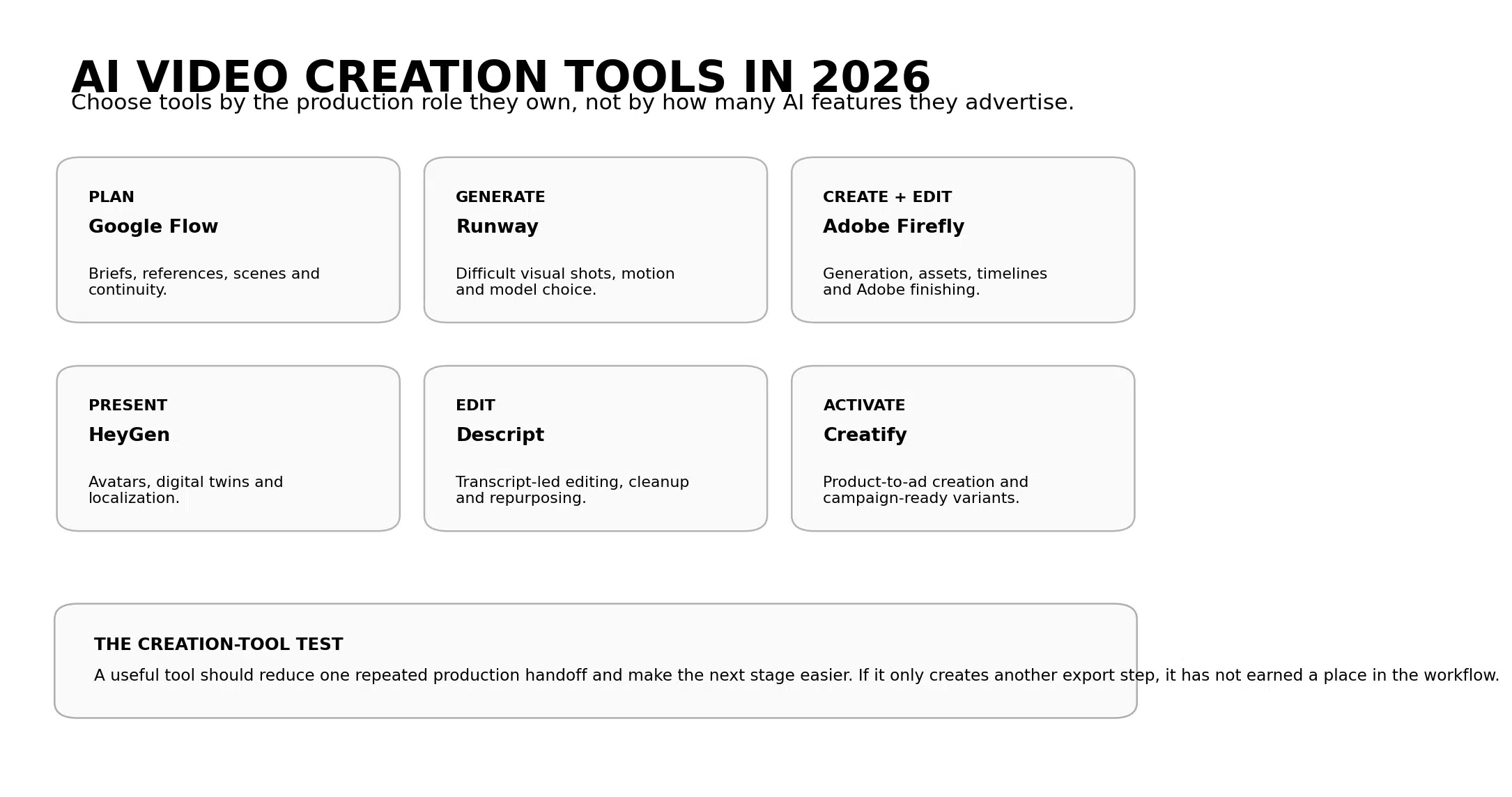

Figure 1. Six AI video creation roles mapped to the tools that handle them most naturally.
AI Video Creation Tools Are Becoming Full Production Workflows
The AI video market is maturing in a useful way. The biggest product updates are no longer only about whether the model can create a more realistic clip. They are about what happens before and after that clip.
On August 27, Google updated Flow with new production controls. Start and end frames help preserve continuity between moments. A faster 360p drafting mode lets creators test compositions before spending more credits. Approved clips can then move into 1080p or 4K output.
One day earlier, Runway Dev added WAN 3.0 with native audio, image, video and audio references, first and last keyframes and video up to 30 seconds. Those controls matter because production consistency depends on reference and timing, not only prompt quality.
Adobe is solving the other side of the workflow. Its new Firefly generation and editing beta connects image and video generation, project media, generation history and a video timeline inside one workspace.
Those releases point to the same change: AI video creation tools are becoming less isolated.
A small business therefore does not need the tool with the longest feature list. It needs the tool that owns one part of the workflow well enough to make the next stage easier.
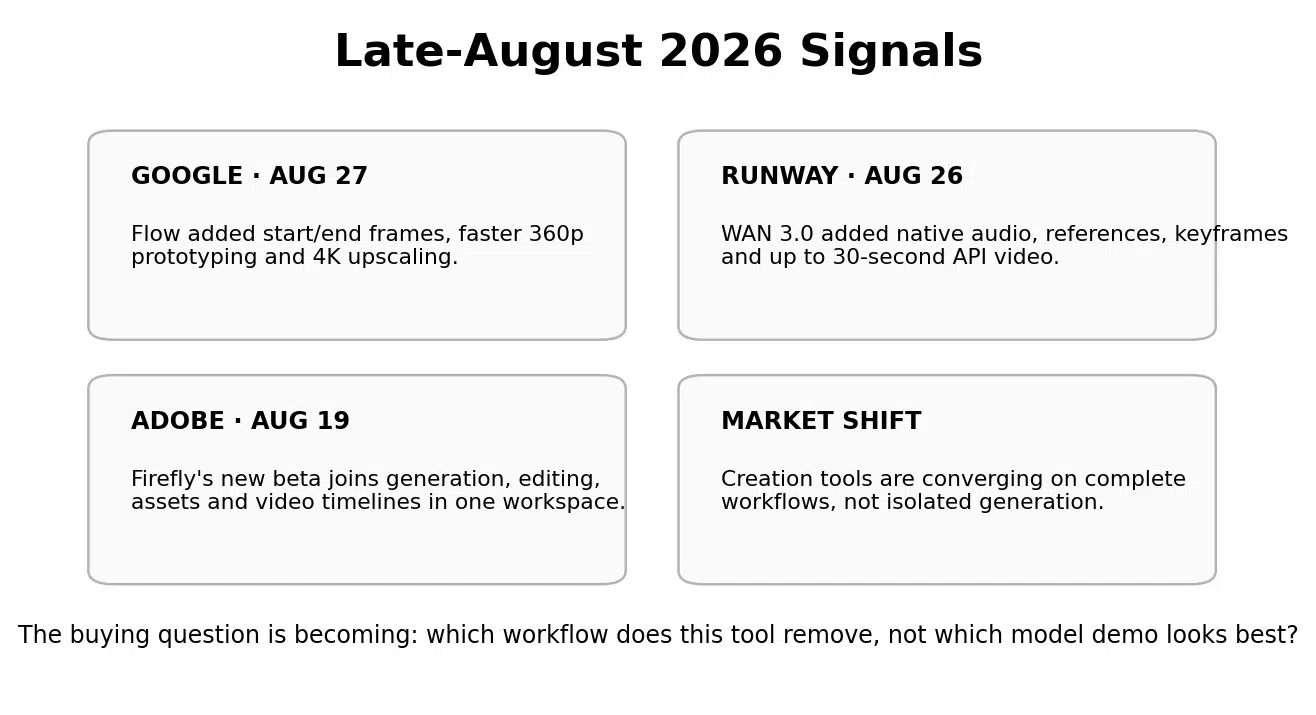

Figure 2. Late-August 2026 signals showing AI video creation moving from isolated generation toward connected production.
What Are AI Video Creation Tools?
AI video creation tools are software products that use artificial intelligence to help plan, generate, edit, localize, present, repurpose or publish video.
The category is broad enough that a single comparison can become misleading.
A cinematic generator and a transcript editor may both be AI video creation tools even though they replace different production work. An avatar system can remove repeated filming. A product-ad generator can remove repetitive creative assembly. A planning tool can prevent expensive generation from happening before the shot logic is clear.
The better way to evaluate the category is by production role.
AI video creation tools vs. AI video generators
An AI video generator mainly creates new footage from prompts, images, references or video. An AI video creation tool can sit anywhere in the process, including planning, editing, translation, voice, presentation or activation.
Every generator is a creation tool. Not every creation tool is a generator.
AI video creation tools vs. AI video creation platforms
A creation platform tries to carry several production stages inside one environment. A creation tool may be a specialist. Descript can be the editing tool inside a larger workflow. Creatify can be the activation tool. Flow and Firefly are increasingly behaving like broader platforms.
The specialist is often the better choice when the business has one expensive bottleneck. The platform is more useful when it can remove several handoffs without reducing control.
The Complete AI Video Creation Workflow
The workflow should begin with verified source material rather than with the software.
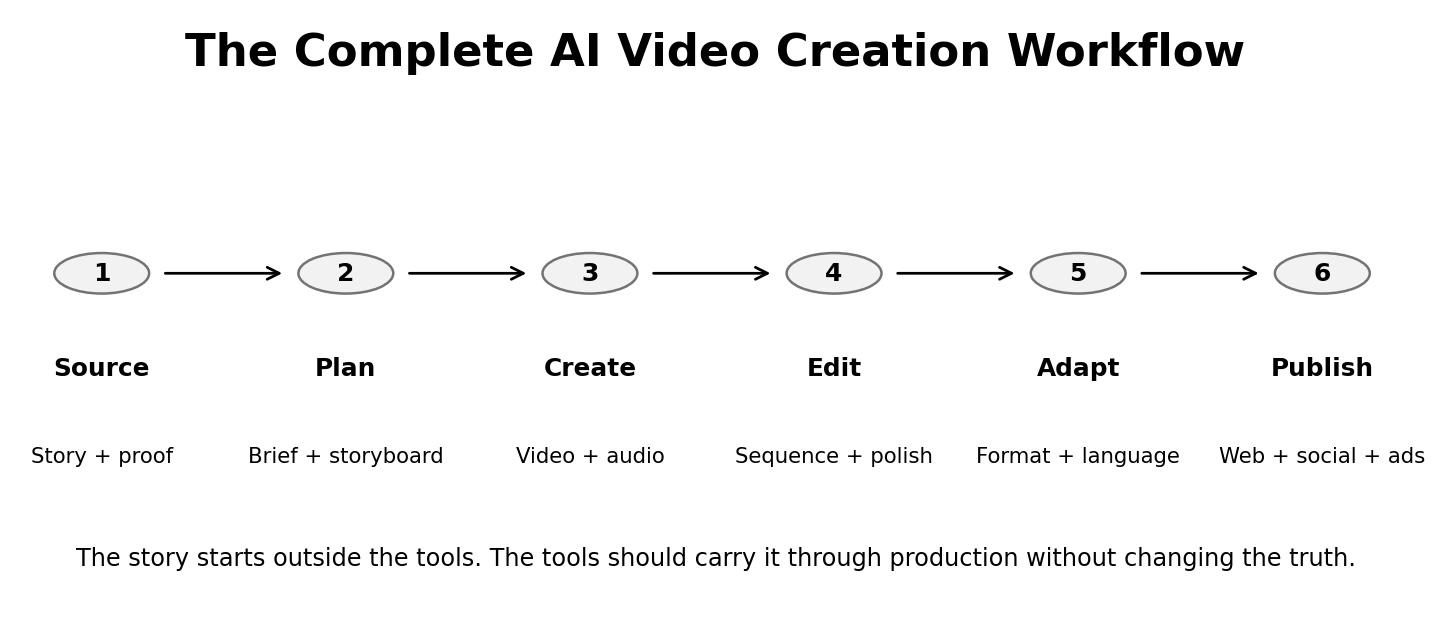

Figure 3. The complete workflow: source, plan, create, edit, adapt and publish.
1. Source: lock the story and proof
Store the founder language, product facts, customer evidence, brand assets, prices, identity permissions and intended customer action outside the tool. These are inputs the model should preserve.
2. Plan: turn the source into a shot or scene structure
Use a brief, storyboard or scene plan to decide what the viewer must understand before generation begins. Planning lowers the cost of being wrong.
3. Create: generate only the work AI should replace
Use AI for the difficult shot, background, product movement, presenter, voice or supporting media that would otherwise slow production.
4. Edit: turn output into a sequence
Correct pacing, captions, audio, transitions, framing and story order in one primary finishing environment.
5. Adapt: create the right version for the channel
Vertical, square and horizontal versions need intentional composition. Localization may require voice, text and cultural review.
6. Publish: connect the video to the business system
The asset should move into the website, social channel, paid media, sales process, training workflow or email program without losing the source truth.
|
The creation-tool rule Choose tools by the production handoff they remove. If a tool creates another export, correction or rebuilding step without replacing work, it has not earned a place in the workflow. |
|---|
6 AI Video Creation Tools for Six Different Jobs
These tools are not ranked from best to worst. Each represents a different production role. Current features and pricing were verified from official vendor sources.
|
Tool |
Primary role |
Current entry pricing |
Best business use |
What it removes |
Main tradeoff |
|---|---|---|---|---|---|
|
Google Flow |
Planning + visual continuity |
Free credits; Google AI Plus $4.99/month |
Cinematic storyboards, references, scene building and controlled visual production |
Disconnected concepting and expensive high-resolution trial-and-error |
Best for visual production, not a complete publishing or business-automation stack |
|
Runway |
Generated shots + model choice |
Free; Standard $15/month or $12 annual |
Cinematic scenes, product visuals, difficult shots and model flexibility |
Location, VFX, camera and generation bottlenecks |
Credit economics vary sharply by model and output quality |
|
Adobe Firefly |
Generation + connected editing |
Free daily access; Standard $9.99/month |
Commercial creative teams already using Adobe |
Moving between generation, asset management and basic editing environments |
Detailed finishing may still move to Premiere or other professional tools |
|
HeyGen |
Presenter + localization |
Free; Creator $29/month |
Founder explainers, avatars, digital twins and multilingual business video |
Repeated filming, presenter logistics and localization |
Less useful when no human presenter belongs in the story |
|
Descript |
Editing + repurposing |
Free; Hobbyist $16/month annual |
Interviews, podcasts, webinars and spoken video |
Transcript cleanup, clips, captions, rough cuts and repetitive spoken-media editing |
Heavier projects can use more media hours and AI credits |
|
Creatify |
Product-to-ad activation |
Free; Starter $39/month |
Ecommerce products and repeated paid creative |
URL-to-video assembly, creator-style variants and ad-production repetition |
Most useful for marketing activation, not cinematic brand-film production |
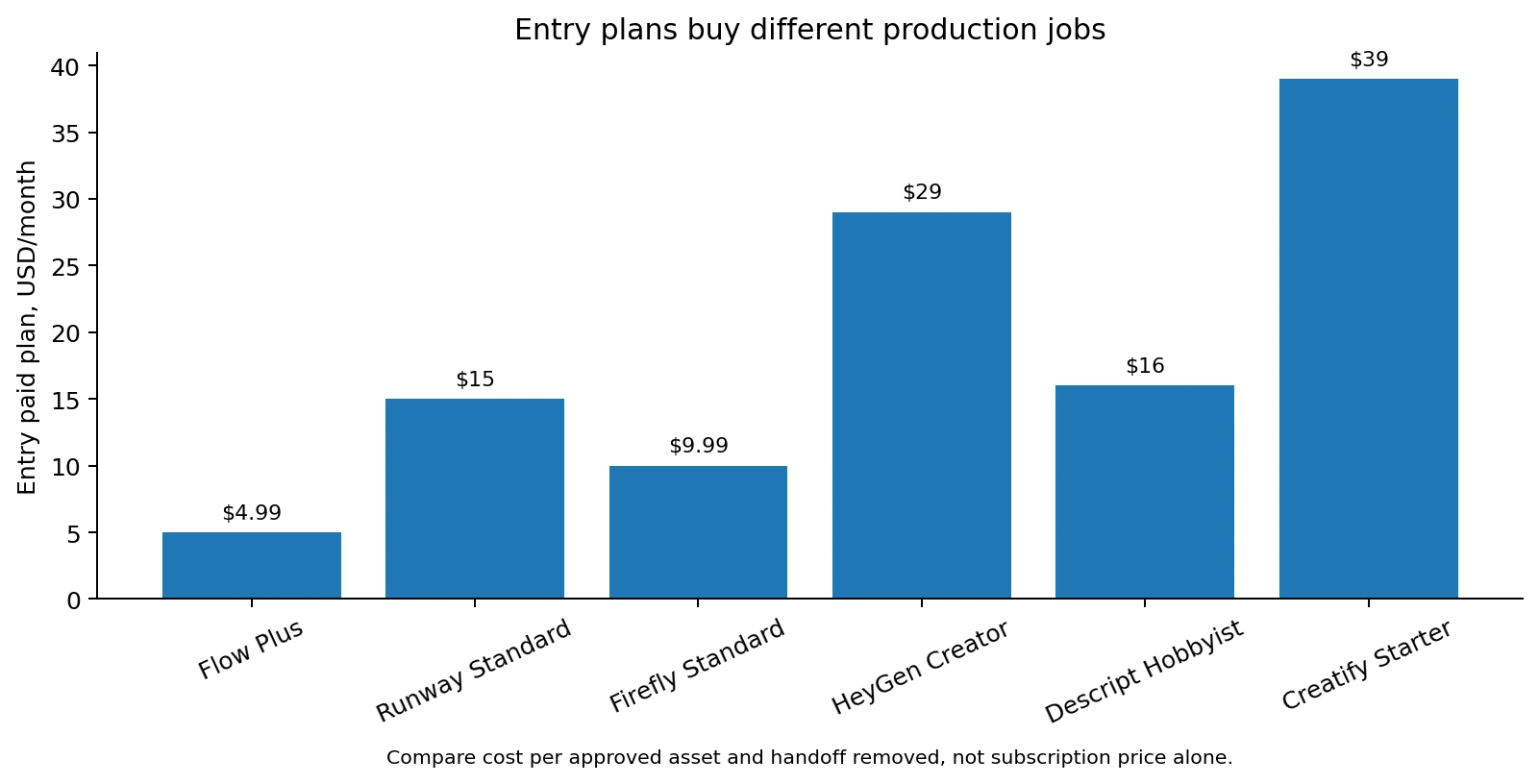

Figure 4. Entry plans across six creation roles. Price alone does not reveal how much workflow each tool removes.
Google Flow: best when planning and continuity are the hard part
Flow increasingly behaves like a filmmaker-oriented creation environment.
Its current product page includes Veo 3.1, Gemini Omni, text-to-video, frames-to-video, visual references, SceneBuilder, characters and editing tools. Google's August 27 update added start and end frames, 360p drafts and high-resolution finishing.
Social Scion assessment: Flow is strongest when the business needs to develop a visual concept and preserve characters, objects or environments across several generated moments. It is less necessary for a straightforward talking-head edit.
Runway: best when the shot itself is expensive
Runway is useful when AI is replacing the most difficult visual production step.
Its current pricing page lists Standard at $15 per month or $12 with annual billing, with access to Runway and partner models, 4K upscaling and watermark-free output.
Runway Dev's August 26 WAN 3.0 release is a useful example of how the platform is expanding production control. References, keyframes, native audio and longer clips help teams move beyond single-shot experimentation.
Social Scion assessment: use Runway when camera behavior, visual transformation, location or product motion is the bottleneck. Do not use the most expensive generator for connective shots the edit can solve more cheaply.
Adobe Firefly: best when generation and finishing should stay close
Adobe Firefly's August beta shows what a creation tool looks like when generation is expected to live beside production management.
The new unified generation-and-editing workspace lets creators generate images and videos, organize project media, reuse generated assets as references and work with a video timeline.
The current Firefly plans list Standard at $9.99 per month with 2,000 generative credits and Pro at $19.99 with 4,000 credits.
Social Scion assessment: Firefly is a strong fit when the business already relies on Adobe for commercial creative and wants AI video to feed the existing design and editing process rather than create another isolated workflow.
HeyGen: best when the person is part of the production problem
HeyGen is strongest when the business has to repeat a human presence.
Its current pricing page offers a free tier and Creator at $29 per month. Paid plans add more credits, longer video, voice cloning, higher output quality and broad language support.
The platform's mature independent review depth is also useful evidence. HeyGen's G2 profile has a large review base, with recurring positives around ease, avatars, speed and localization and recurring negatives around credits and cost.
Social Scion assessment: use HeyGen when identity, presenter continuity or language scale is essential. Skip it when the product, environment or customer proof should carry the story without a presenter.
Descript: best when the useful story already exists in spoken media
Descript solves a very different creation job. It is most useful after the camera has already captured the material.
The current Descript pricing lists Hobbyist at $16 per person per month with annual billing and Creator at $24. The workflow includes transcript-based editing, AI cleanup, clips, captions and Underlord.
Social Scion assessment: use Descript when interviews, podcasts, webinars or founder recordings already contain the story. It reduces the editing burden without requiring the team to regenerate what is already real.
Creatify: best when the finished video needs to become ad creative
Creatify sits closest to the activation end of the creation workflow.
Its current pricing page lists Starter at $39 per month and Pro at $99, with product-to-video workflows, Creative Agent, AI actors, templates and broader ad-production features.
Social Scion assessment: Creatify is useful when the business already knows the product, offer and proof and needs to create many ad-ready variations. It is not the first tool to choose when the creative concept itself is still unclear.
The Myth: One AI Video Creation Tool Should Do Everything
Feature convergence makes the one-tool dream more believable every month.
Flow adds editing. Firefly adds timelines. HeyGen adds agentic creation. Creatify adds activation. Descript adds more generation. Runway adds more models and production features.
That does not mean one platform should own every production stage.
The right question is whether consolidation removes work without reducing control.
If one platform can replace a planning tool and a generation tool cleanly, that is useful. If forcing the edit into the same platform creates more correction than a dedicated editor, specialization is still better.
A creation workflow should become simpler because of AI, not more complicated because every vendor now has an AI feature.
How to Choose AI Video Creation Tools in 8 Steps
1. List the video jobs you repeat
Separate cinematic generation, presenter video, editing, localization, product ads and other recurring work.
2. Find the expensive handoff
Where does the work slow down? Briefing, storyboarding, filming, generation, editing, localization, resizing or ad variation?
3. Protect the source truth
Document product facts, approved customer proof, brand language, prices, permissions and the next action outside the software.
4. Test one tool against one real workflow
Avoid generic prompts. Use the actual source material the business will produce next month.
5. Measure time to publishable output
Count the failed versions, corrections, export steps and final finishing time.
6. Create a second format
Test whether the tool can adapt the asset without damaging the story or product truth.
7. Remove a tool or manual step
A new creation tool should replace something. If nothing disappears, the workflow has become heavier.
8. Review overlap every quarter
AI products are absorbing each other's features quickly. Recheck whether the specialist tool still earns its subscription.
Practical Prompt: Choose the Tool by the Production Role
|
Start with the workflow, not the vendor Evaluate the verified AI video workflow below. Classify the primary production bottleneck: Then recommend: Do not recommend a new tool if the current workflow already handles the job efficiently. Do not invent business facts, customer proof, product capabilities or production requirements. If information is missing, mark it [NEEDS SOURCE]. Current workflow: [paste workflow]. |
|---|
When Should a Small Business Pay for AI Video Creation Tools?
Pay when the production role has already proved it repeats.
- Planning controls reduce failed high-resolution generations.
- Generated visuals replace a real location, VFX or product-shoot cost.
- A digital twin or avatar replaces repeated presenter recording.
- Localization replaces repeated dubbing or rerecording work.
- Transcript-led editing removes enough manual editing time to justify the plan.
- Product-to-ad creation produces enough approved variants to improve campaign testing.
- A broader platform replaces two separate paid tools without making the final output worse.
Common AI Video Creation Tool Mistakes
Choosing by demo quality alone
Vendor showcase clips prove the ceiling, not the normal workflow. Test your own source material.
Buying three tools for the same production role
Model choice can be useful, but duplicated subscriptions often create more testing than finished work.
Using a presenter when the product should be the hero
An avatar is a format, not a requirement.
Ignoring correction time
A cheap generation is expensive when the product, captions or identity require repeated fixes.
Comparing credits across vendors
Credits buy different models, seconds and tasks. Compare approved output and work removed.
Editing in every creation tool
Use generator-native correction when needed, then finish in one primary editing environment.
Letting the tool rewrite the business proof
AI can improve execution. Customer results, product claims and founder history should remain verified.
Failing to connect the asset to an owned destination
Creation is not the business outcome. The video should lead toward a website, product page, email list, booking or another owned next step.
FAQ: AI Video Creation Tools in 2026
What are AI video creation tools?
AI video creation tools use artificial intelligence to help plan, generate, edit, localize, present, repurpose or publish video.
What is the difference between an AI video creation tool and an AI video generator?
A generator mainly creates new footage. A creation tool can also handle planning, editing, avatars, localization, repurposing or activation.
What are the best AI video creation tools for small business?
The right choice depends on the production role. Flow fits planning and visual continuity, Runway generated scenes, Firefly Adobe-centered creation, HeyGen avatars and localization, Descript spoken-video editing, and Creatify product-ad activation.
Is Google Flow free?
Google Flow currently offers free access with daily credits. Paid Google AI tiers increase monthly credits and quality options.
How much does Runway cost?
Runway currently offers a free tier. Standard is $15 per month or $12 per month with annual billing.
How much does Adobe Firefly cost?
Adobe Firefly Standard currently costs $9.99 per month and Pro costs $19.99 per month.
Which tool is best for AI avatars and localization?
HeyGen is a strong choice when the repeated production problem is presenter video, digital twins or multilingual delivery.
Which AI video creation tool is best for editing?
Descript is especially strong for spoken video because users can edit audio and video through the transcript.
Which tool is best for product ads?
Creatify is designed around product-to-video and ad-production workflows, including URL-based creative generation and repeated variations.
How many AI video creation tools should a small business use?
Use as few as possible. Add a tool only when it removes a different repeated production bottleneck or replaces existing work.
The 2026 Stance: Creation Tools Should Make Production Feel Smaller
AI video creation tools are expanding quickly.
That does not mean a small business needs a larger stack.
The strongest workflow gets smaller as the tools get better. Planning becomes cheaper. Hard shots become possible. Repeated presenters can be localized. Spoken media becomes easier to edit. Product creative becomes easier to adapt.
What should remain outside that automation is the part the customer is deciding whether to trust.
The founder point of view. The product truth. The customer proof. The offer. The reason this story matters.
Choose tools for the work they remove.
Keep the story as the system they serve.
Start With the Story Before You Choose the Creation Tool
The right software becomes much easier to choose once the business knows which real story, product truth or customer proof the video needs to carry.
Social Scion AI starts with that source, then chooses the cinematic, avatar, product, UGC or AI-native production workflow around the customer action.
|
Get your Free Film See what happens when the real business story becomes the source before the AI video creation tools are chosen. Claim the Free Film Story that attracts. System that converts. |
|---|
Sources
- Google Flow creative controls, Aug 27, 2026
- Google Flow product page
- Runway Dev WAN 3.0, Aug 26, 2026
- Runway pricing
- Adobe Firefly unified generation and editing beta
- Adobe Firefly pricing
- HeyGen pricing
- HeyGen G2 reviews
- Descript pricing
- Creatify pricing