Key Takeaways
• The useful AI video tools question in 2026 is no longer which platform wins a generic ranking. It is which few tools remove the repeated work between a verified story and a publishable business asset.
• Google Flow's August 27 update added first-and-last-frame control, faster 360p prototyping and 4K upscaling. That is a strong signal that AI video creation is moving from one-shot generation toward iterative production workflows.
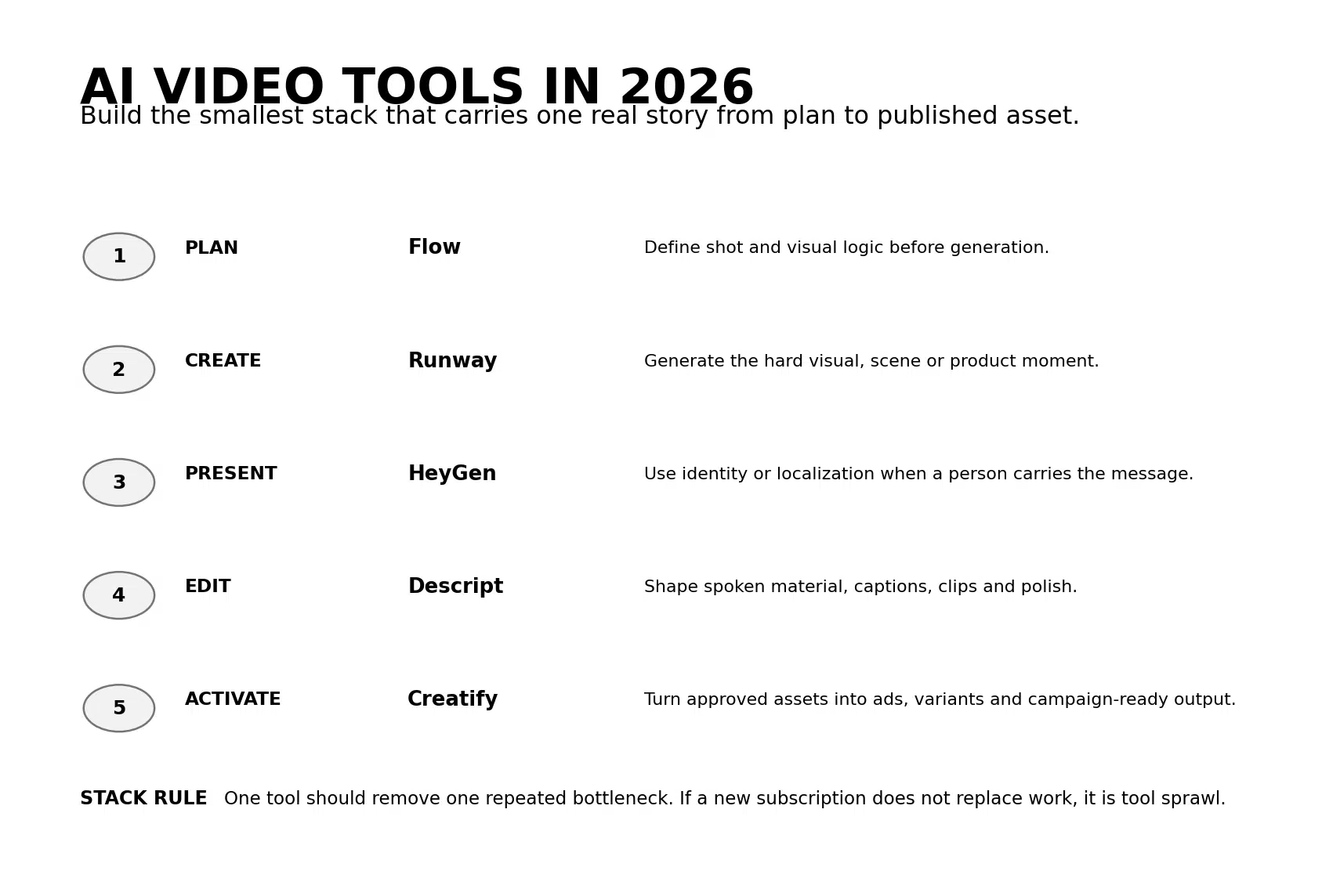
• A practical small-business stack can be divided into five jobs: plan, generate, present, edit and activate. Google Flow, Runway, HeyGen, Descript and Creatify represent five different jobs rather than five substitutes for the same one.
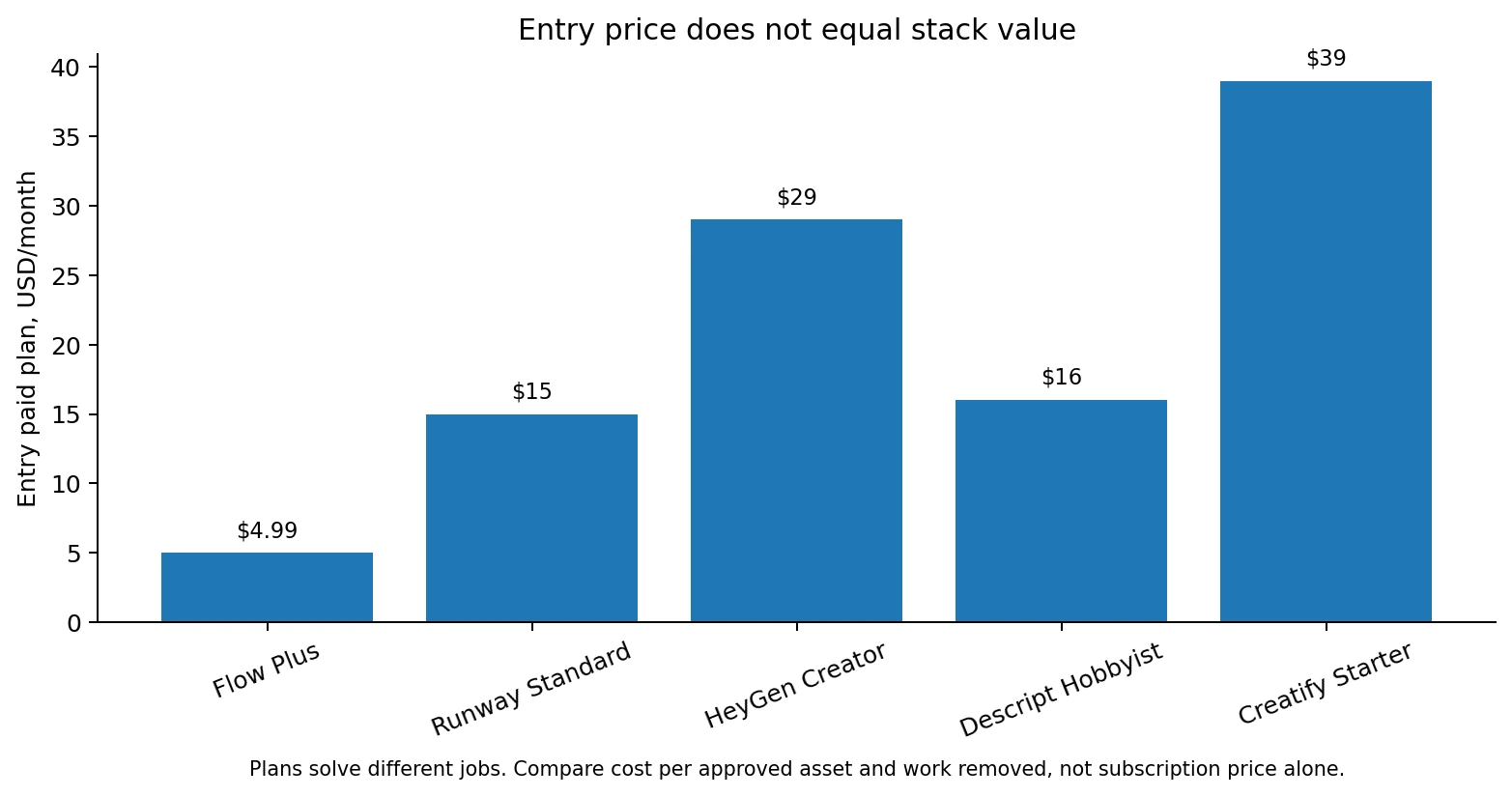
• Entry price is a weak comparison metric. Google Flow Plus starts at $4.99 per month, Runway Standard at $15 monthly or $12 with annual billing, HeyGen Creator at $29, Descript Hobbyist at $16 with annual billing and Creatify Starter at $39. Those plans buy different kinds of work.
• The best stack is the smallest stack. Add a tool only when it removes a measurable production bottleneck, then connect the output to an owned destination such as the website, email list, product page or booking flow.
AI Video Tools Are Becoming Production Systems
The most useful AI video update at the end of August was not another model leaderboard.
On August 27, Google updated Flow with new creative controls. The update added first-and-last-frame control for smoother transitions, 1080p and 4K output options, and a faster 360p drafting workflow so creators can test composition before spending more credits on the final render.
That sounds like a technical update. For a small business, it points to a larger change.
AI video tools are becoming less about the first render and more about the repeatable workflow around the render. A business can prototype quickly, preserve continuity, upscale only the approved version and then hand the asset into editing or distribution. The value is shifting from model access to production control.
Google demonstrated the same idea earlier in August with The Small Brief, where three creative leaders used Flow to build campaigns for local businesses and nonprofits. The important takeaway was not that the small businesses suddenly needed an AI filmmaking studio. It was that advanced production became more accessible when the creative brief remained the human starting point.
Runway is evolving in parallel. Its current pricing page now gives paid users access to multiple video models and production tools rather than one proprietary generator. Standard includes Gen-4.5, Nano Banana Pro, Aleph, Veo 3.1 and other models, plus 4K upscaling and watermark-free output.
HeyGen has expanded from avatar generation into digital twins, Video Agent, translation, longer-form video and collaboration. Descript now frames Underlord as an AI co-editor rather than a single editing feature. Creatify has moved from product-to-video generation toward Creative Agent, Ad Flow, launching and performance guidance.
The market is telling businesses the same thing from five directions: stop treating every AI video tool as a replacement for every other AI video tool.
What Are AI Video Tools?
AI video tools are software products that use artificial intelligence to plan, generate, transform, edit, localize, present, repurpose or distribute video.
That definition matters because the category now includes tools that solve very different jobs. A cinematic generator, avatar platform, transcript-led editor and ad-production system can all be called AI video tools while creating completely different business value.
The useful categories are:
• Planning and pre-production tools that turn a brief into a storyboard, scene list or visual direction.
• Generative video tools that create new shots, environments, product motion or B-roll from prompts and references.
• Avatar and identity tools that replicate or create presenters, voices and localized human delivery.
• AI editing tools that shape existing video through transcripts, prompts, captions, cleanup and repurposing.
• Activation tools that turn approved assets into ad variants, placement-ready formats, published content or campaign tests.
The same tool can sit in more than one category. The stack is still easier to design when each product is assigned one primary job.
The Smallest Useful AI Video Stack
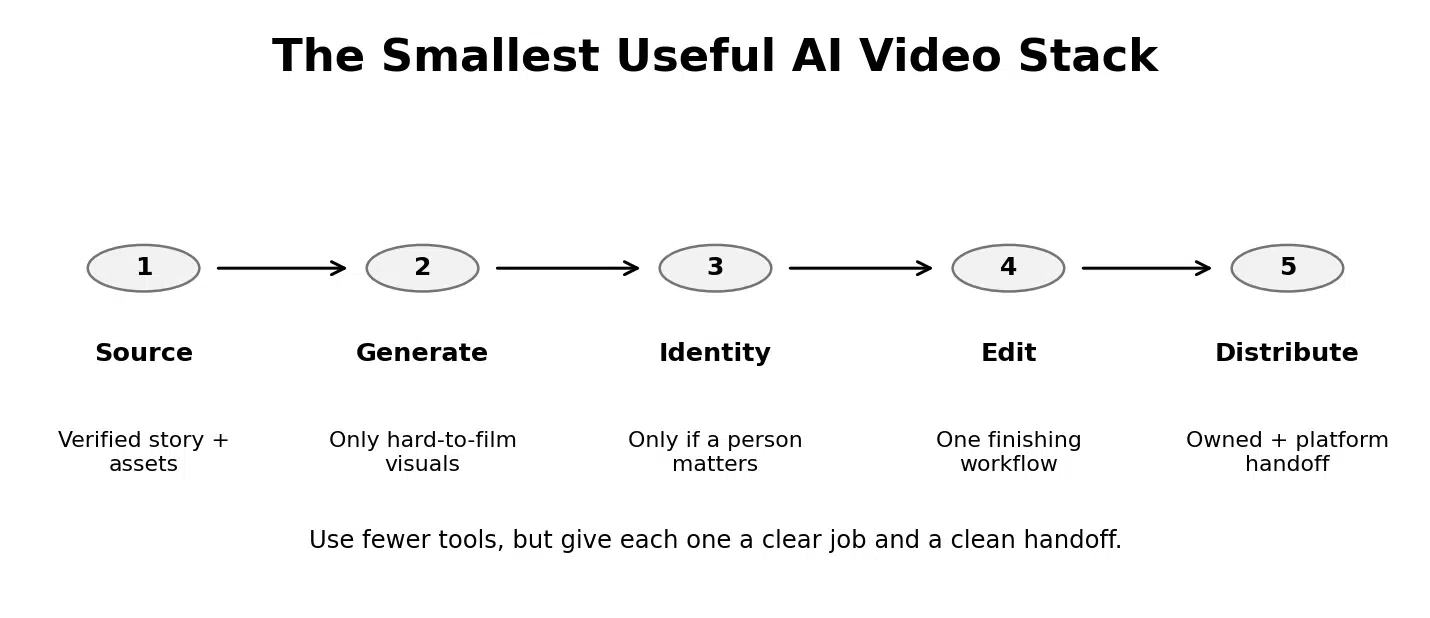
A small business does not need one platform for every new release. It needs a clean path from verified source material to a useful customer-facing asset.
1. Source: keep the verified story outside the stack
Start with the founder insight, customer language, product truth, approved proof, offer and desired customer action. The stack should process this source. It should not invent the source.
2. Generate: use AI only for the hard visual work
If the difficult part is an impossible location, product motion, cinematic scene or visual concept, use a generative tool. Do not generate every frame simply because the tool can.
3. Identity: add a presenter only when a person carries value
A digital twin, avatar or voice can remove repeated recording. Use it when identity, explanation or localization helps the customer. Skip the avatar layer when the product or environment is the real subject.
4. Edit: finish in one workflow
Choose one editing environment where captions, timing, audio, cleanup, clips and format changes are easy to control. The final asset should not bounce across three editors because every tool has one attractive feature.
5. Distribute: connect the asset to the business system
A finished video should lead somewhere. Use paid media, social, email, YouTube or the website as distribution, then bring the audience back to an owned page, list, product or booking path.
5 AI Video Tools for Five Different Jobs
These tools are not ranked from best to worst. They are mapped to the job they solve most naturally. Capabilities and pricing were verified from current official sources. Independent review evidence is used only where the review base is mature enough to be useful.
Google Flow: best for planning and visual exploration
Google Flow now looks less like a prompt playground and more like a pre-production and generation environment. Its current Flow product page includes Gemini Omni Flash, Veo 3.1, Agent, text-to-video, frames-to-video, Ingredients to Video, video extension, video-to-video editing, Scenebuilder, characters and avatars.
The free tier currently includes 50 daily Flow credits. Google AI Plus costs $4.99 per month and includes 200 monthly Flow credits plus 1080p upscaling. Google AI Pro costs $19.99 with 1,000 monthly Flow credits, while higher Ultra tiers increase credits and 4K capability.
Social Scion assessment: Flow earns a place when the business needs visual concepting and scene development before the edit. It should not become the place where the business discovers the customer story.
Runway: best for difficult generated visuals
Runway is strongest when the shot itself is the production problem. The current Runway pricing page lists the free tier with 125 one-time credits. Standard costs $15 monthly or $12 with annual billing and includes 625 monthly credits, all AI image and video models, 4K upscaling and no watermark.
Runway's own pricing page translates 625 Standard credits into roughly 52 seconds of Gen-4.5 output, which is a useful reminder that monthly price is not the same thing as finished-video volume. The same plan can generate very different amounts depending on the model.
Social Scion assessment: use Runway for the shots the camera, location, VFX budget or product setup cannot easily deliver. Keep planning, proof and final narrative control elsewhere.
HeyGen: best when a person or language is the bottleneck
HeyGen is strongest when repeated human delivery is expensive. Its current pricing page includes three free videos per month. Creator costs $29 per month with 600 credits, videos up to 30 minutes, 1080p output, voice cloning and 175+ languages and dialects. Pro costs $49 with 1,000 credits and 4K export.
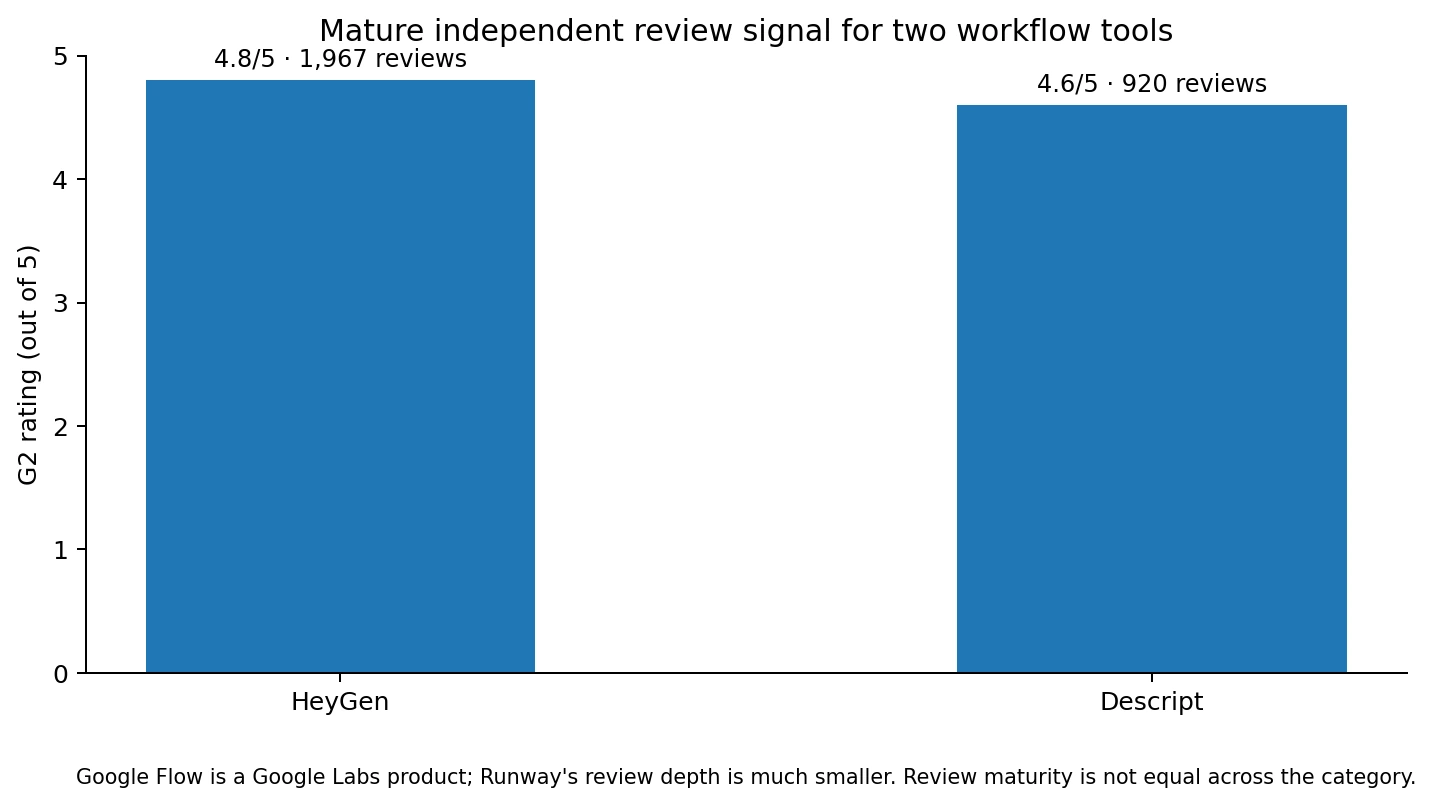
HeyGen also has mature independent review depth. G2's current HeyGen seller profile shows 4.8/5 across 1,967 reviews. The recurring positives are speed, ease, realism and video creation without repeated filming. The recurring tradeoffs center on pricing, credits and generation refinement.
Social Scion assessment: HeyGen belongs in the stack when the person is part of the message. Do not add an avatar simply because a product plan includes one.
Descript: best for editing and repurposing spoken video
Descript is the cleanest fit when the source already exists as an interview, founder recording, podcast, webinar or screen capture. Its current AI video workflow combines transcript-based editing with Underlord, Studio Sound, clip creation, filler-word removal, AI speech and generated supporting visuals.
Hobbyist currently costs $16 per person per month with annual billing and includes 10 media hours plus 400 AI credits. Creator costs $24 annually and increases that to 30 media hours and 800 AI credits.
The Descript G2 seller profile currently shows 4.6/5 across 920 reviews. Users repeatedly praise time savings and text-based editing. Performance on heavier projects and credit consumption remain common considerations.
Social Scion assessment: Descript should be the editing layer when the human words already contain the story. It is less useful as the primary cinematic generator.
Creatify: best when the finished video needs to become an ad system
Creatify earns a place at the activation end of the stack. The current pricing page lists Starter at $39 per month with 100 credits and Pro at $99 with 300 credits. Both include Creative Agent and creation tools, while Pro expands actor access, templates, models and ad capabilities.
Creatify's product increasingly connects generation to Ad Flow, Ad Launcher, competitor tracking and performance guidance. That makes it more useful for marketers who already have a product, offer and proof than for a business still trying to decide what the first story should say.
Social Scion assessment: add Creatify only when paid creative is a repeated job. If the business runs a handful of campaigns a year, existing platform-native tools may be enough.
The Myth: More AI Video Tools Create a Better Workflow
More tools usually create more capability. They can also create more friction.
Every new platform adds another credit system, file format, login, prompt syntax, export step, billing cycle and learning curve.
The stack becomes useful when the handoffs are intentional. Flow plans. Runway generates. HeyGen presents. Descript edits. Creatify activates. A business may only need two of those layers.
The strongest stack is therefore not the most complete stack. It is the minimum number of tools required to move one real story into the customer experience with less work than before.
If the tool does not remove work, it is not part of the workflow yet.
How to Build Your AI Video Tool Stack in 8 Steps
1. List the video jobs that actually repeat
Write down what your business makes every month: founder explainers, product ads, social clips, training, cinematic campaigns, customer stories or something else.
2. Mark the expensive step in each job
Is the bottleneck recording, shooting, scene creation, editing, translation, resizing, repurposing or ad variation? Choose the tool around the bottleneck.
3. Protect the source truth
Store approved product facts, founder language, customer proof, pricing, identity permissions and offer details outside the AI tools so they can be reused consistently.
4. Test one tool per job
Do not compare five generators at once. Pick one planning tool, one generation tool or one editing tool and run the same real workflow through it.
5. Measure time to publishable output
Count generation time, failed versions, corrections, exports and the final finishing work. The fastest first render is not always the fastest finished asset.
6. Remove an old step before adding a subscription
If a new AI editor does not replace an existing editor or manual task, the stack has become more complicated.
7. Keep one finishing environment
Where possible, centralize the final review, captions, timing, brand check and export in one workflow rather than polishing separately inside every generator.
8. Review the stack quarterly
AI video products absorb each other's features quickly. Recheck whether a platform you already pay for has replaced a specialist subscription before renewing.
Practical Prompt: Audit Your AI Video Stack
Audit the AI video workflow below. For each repeated video job, identify: SOURCE MATERIAL, CURRENT BOTTLENECK, TOOL CURRENTLY USED, HUMAN REVIEW REQUIRED, FINAL DESTINATION, MONTHLY COST, HOURS SPENT, and WHAT THE TOOL ACTUALLY REPLACES. Then classify every tool KEEP, CONSOLIDATE, CANCEL or TEST. Recommend the smallest useful stack with one primary tool for each necessary job: PLAN, GENERATE, PRESENT / LOCALIZE, EDIT and ACTIVATE. Do not recommend a new subscription unless it replaces a measurable repeated task. End with expected monthly tool cost, expected workflow removed, risk of tool overlap and one 30-day test to validate the stack.
When Should You Pay for Another AI Video Tool?
Pay only when the new tool does at least one of these jobs better enough to replace existing work:
• It removes a recurring filming or location cost.
• It removes repeated presenter recording or translation.
• It removes a meaningful amount of editing or repurposing time.
• It reduces failed generations by giving better references, continuity or control.
• It turns approved creative into enough ad variations to improve testing speed.
• It consolidates two or more tools already in the stack.
Do not buy because the model is trending or because the free tier produced one impressive clip. The tool has to survive the boring monthly work.
Common AI Video Tool Stack Mistakes
Using three generators for the same job
Model choice is useful, but tool duplication can create more testing than production. Keep a secondary generator only when it solves a clear problem the primary one cannot.
Buying an avatar plan for a product-led brand
If the customer needs to see the product, an avatar may add cost without adding meaning.
Editing inside every generation tool
Use generator-native edits for corrections, then finish in one editing environment whenever possible.
Comparing credits as though they are the same unit
A Flow credit, Runway credit, HeyGen credit and Creatify credit do not purchase the same kind of output. Compare approved work, not credits.
Keeping tools because the annual plan is already paid
Sunk cost is not a workflow strategy. If the product no longer removes work, stop building the process around it.
Letting AI tools become the content strategy
The stack can produce, adapt and distribute. It cannot independently know which business truth deserves attention or which customer hesitation matters.
Ignoring the owned destination
A strong video tool stack can still produce rented attention. Connect useful assets to the website, email list, product or booking path.
Failing to revisit overlap
Platforms are adding models, editing, avatars and publishing quickly. Review whether one tool has absorbed another tool's job before renewal.
FAQ: AI Video Tools in 2026
What are AI video tools?
AI video tools use artificial intelligence to plan, generate, edit, localize, present, repurpose or distribute video. The category includes cinematic generators, avatar platforms, editors and ad-production tools.
What are the best AI video tools?
The best tool depends on the job. Google Flow is strong for planning and visual exploration, Runway for generated scenes, HeyGen for avatars and localization, Descript for spoken-video editing and Creatify for product-ad activation.
How many AI video tools does a small business need?
Usually fewer than the market suggests. Many small businesses can work with one generation tool and one editing or activation tool. Add another only when it removes a different repeated bottleneck.
Is Google Flow free?
Yes. Google Flow currently offers 50 daily credits without a Google AI subscription. Paid Google AI tiers increase monthly credits, tool creation access and upscaling.
How much does Runway cost?
Runway currently offers a free plan with 125 one-time credits. Standard is $15 per month, or $12 per month with annual billing, and includes 625 monthly credits.
How much does HeyGen cost?
HeyGen currently offers three free videos per month. Creator costs $29 per month and Pro costs $49 per month, with credits, longer videos, voice cloning and localization features on paid tiers.
Is Descript an AI video generator or editor?
Descript is primarily an AI-assisted recording and editing environment. It also includes generated B-roll, scenes, voices and other AI creation tools, but its clearest strength is editing spoken media through text.
What is Creatify best for?
Creatify is strongest for marketers who need product-to-video ads, AI actors, ad templates, repeated creative variants and closer handoff into paid-media workflows.
Should I choose tools based on G2 ratings?
No. Review depth is useful evidence, but category maturity varies. Some newer products or platform features have little product-specific G2 coverage. Use reviews alongside official capability verification and your own workflow test.
How do I know when to cancel an AI video tool?
Cancel it when it no longer removes a repeated task, duplicates another tool, requires too much correction or costs more than the production work it replaces.
The 2026 Stance: The Tool Stack Should Get Smaller as the Technology Gets Better
AI video tools are absorbing more of the production process.
Google Flow is adding editing and continuity controls. Runway is adding more models and production options. HeyGen is moving into agentic video, localization and team workflows. Descript is turning editing into a conversational process. Creatify is linking production to ad activation.
That should reduce the number of tools a business needs.
The wrong response is to collect every new capability in a separate subscription. The better response is to choose one clear source story, assign each tool one job and remove the tool when another product handles the job better.
The business should become easier to recognize as the technology becomes easier to use.
Story first. Tool second. Stack only what earns its place.
Start With the Story Before You Build the Stack
A small business does not need more AI video tools until it knows what customer story, product truth or proof those tools are meant to carry.
Social Scion AI starts with the real story, then chooses the cinematic, avatar, product, UGC or AI-native production workflow around the customer action.
Get your Free Film
See what happens when the real business story becomes the source before another AI video tool enters the stack.
https://socialscionai.fillout.com/free-cinematic-film
Story that attracts. System that converts.
Visuals