Key Takeaways
|
An AI video creation platform should do more than generate one strong clip. It should help move the work from brief and storyboard through generation, editing, brand or identity control, collaboration, localization and a publishable handoff. The category is moving quickly toward platform behavior. Google Flow combines Veo generation, scene building, characters and editing. Runway combines multiple video models and production tools. Adobe Firefly connects video generation to the Adobe creative stack. HeyGen connects avatars, Video Agent, localization, workspaces and business integrations. The most important buying question is not which platform has the best model. It is which platform removes the most repeated production friction without giving up control of the story, proof, product or identity. Review evidence should be weighted by depth. HeyGen and Adobe Firefly have meaningful G2 coverage. Runway's G2 review base is much smaller, so its rating should be treated as a limited signal rather than a mature consensus. A small business should test one real workflow before paying for scale. Measure time to a publishable asset, corrections, failed generations, localization effort, team handoffs and how easily the final video moves into the channel where it will work. |

Figure 1. The seven-layer test for deciding whether a product behaves like an AI video creation platform rather than only a generator.
The AI Video Market Is Moving From Generators to Platforms
The strongest signal this week did not come from a new cinematic model. It came from how an AI video company described what small businesses are now buying.
On August 27, HeyGen published its G2 Fall 2026 small-business results, reporting number-one positions in AI avatars, video translation and AI video generation. The vendor framing is self-interested, so the ranking should not be treated as independent editorial proof. The useful part is what sits underneath it: small-business buyers are judging AI video as a broader production system, not only as a prompt-to-video model.
The independent HeyGen G2 profile currently shows 4.8/5 from 1,589 reviews. Review themes repeatedly emphasize ease of use, realistic avatars, faster production and lip-sync quality, while price and credit use appear among the common negatives.
HeyGen's current product now goes well beyond avatars. Its July 2026 update added Video Podcast, website-to-video, Figma-to-video, storyboarding inside Video Agent and longer talking-avatar workflows. The platform can take a script, URL or creative direction, build scenes, add avatars, B-roll, voice and captions, then move the result through editing, localization and publishing.
Google, Runway and Adobe are moving in the same direction from different starting points. Flow is becoming a filmmaking studio around Veo. Runway is becoming a multi-model production environment. Firefly is becoming a commercial creative layer across generation and the Adobe ecosystem.
That is why the keyword AI video creation platform now deserves a different answer from best AI video generator. A generator answers: can this model make the shot? A platform has to answer: can this system help the business repeatedly move from idea to approved asset?
What Is an AI Video Creation Platform?
An AI video creation platform is a software environment that uses artificial intelligence to support multiple stages of video production, usually including some combination of planning, generation, editing, avatars or voices, asset management, localization, collaboration and export.
The important difference is continuity across the workflow.
A standalone generator can create a five-second cinematic shot. A creation platform should help the team decide what the shot is for, combine it with the rest of the video, correct it, keep the brand or identity consistent, adapt it for another language or format, and move it into a real customer-facing channel.
AI video generator vs. AI video creation platform
|
Question |
AI video generator |
AI video creation platform |
|---|---|---|
|
Primary job |
Generate a clip or visual asset |
Move a repeatable video workflow toward a finished business asset |
|
Typical input |
Prompt, image or reference |
Brief, script, URL, deck, source media, brand assets or prompt |
|
Planning |
Usually limited |
May include agent, storyboard, templates or scene planning |
|
Editing |
Often external or basic |
Editing, captions, sequence, timing, audio and format changes are part of the workflow |
|
Consistency |
Model-dependent |
May add characters, brand kits, references, digital twins or reusable assets |
|
Scaling |
Generate more clips |
Localization, collaboration, APIs, templates, workspaces and reusable processes |
|
Success metric |
Good generation |
Publishable output with less total production friction |
The 7 Checks That Matter Before You Choose a Platform
1. Can it start from a business brief, not only a prompt?
The strongest platforms are moving upstream. HeyGen Video Agent can take a prompt, website, document or other source and build a video workflow around it. Flow includes agent capabilities and scene-building tools. The more the system can accept structured source material, the less likely the team is to lose time translating the business objective into disconnected prompts.
2. Does it let you plan before you spend credits?
Storyboarding is not a decorative feature. It is a cost-control feature. A storyboard, shot list or editable scene plan lets the team approve the logic before expensive generation begins. This matters even more when one failed shot may require several regenerations.
3. Does it combine generation with correction?
AI video rarely becomes publishable in one pass. The platform should make correction easier than starting over. Look for scene editing, text-based edits, keyframes, reference replacement, captions, audio, trimming, extending and version control.
4. Can it protect identity, product and brand?
A real business has elements that should not drift: the founder's face, a product label, a package color, a customer quote, a logo, a recurring character or the visual world of the brand. The right platform should give the team ways to lock or reuse those elements instead of hoping the model recreates them.
5. Can it localize without rebuilding the video?
Localization is one of the clearest signs that a tool is becoming a platform. HeyGen supports 175+ languages and dialects on paid plans. Adobe Firefly includes translation features. A platform that can adapt speech, subtitles or presentation without restarting production can remove a real recurring cost.
6. Can more than one person safely work inside it?
For a founder working alone, collaboration may not matter on day one. It matters quickly once an editor, marketer, client, proofreader or agency enters the process. Look for shared workspaces, commenting, roles, templates, centralized brand assets and review steps.
7. Does the final asset move into the next business system?
A finished video needs a destination. That may be YouTube, a paid ad platform, a website, product page, learning system, sales sequence or social channel. A good platform reduces the handoff between creation and use.
|
The platform rule If the team still has to rebuild the story, export assets across several disconnected tools, fix identity drift, translate separately and reassemble every format manually, the product may be a strong generator without being the right creation platform for your business. |
Four AI Video Creation Platform Archetypes
The platforms below should not be ranked as though they solve the same job. They represent four different ways an end-to-end AI video environment can be built.

Figure 2. Four platform archetypes: filmmaker studio, multi-model production studio, commercial creative platform and identity-first business video platform.
|
Platform |
Best platform fit |
Current entry point |
Core workflow strength |
Review evidence |
Main tradeoff |
|---|---|---|---|---|---|
|
Google Flow |
Filmmaker-style visual exploration and scene building |
Free credits available; paid Google AI tiers increase credits and access |
Veo 3.1, agent, scene building, characters, editing and visual ideation in one studio |
No mature product-specific G2 signal used |
Strong creative environment, but less oriented to business avatars, localization and team communication workflows |
|
Runway |
Multi-model cinematic production and VFX-oriented workflows |
Free 125 one-time credits; Standard $15/month or $12 annual |
Access to multiple video models, generation modes, references, upscaling, audio tools and studio formats |
G2 3.8/5 from 18 reviews |
Small review base; credit use and failed generations can raise real production cost |
|
Adobe Firefly |
Commercial creative teams already working in Adobe |
Free daily generations; Standard $9.99/month |
Video generation plus image, audio, partner models and handoff into Adobe creative tools |
G2 4.4/5 from 332 reviews |
Fine control and consistency can still require manual Adobe finishing |
|
HeyGen |
Identity-first business video, localization and repeat communication |
Free 3 videos/month; Creator $29/month |
Video Agent, avatars, digital twins, translation, editing, workspaces, integrations and publishing |
G2 4.8/5 from 1,589 reviews |
Best when a presenter or identity matters; less suited to complex cinematic world-building |
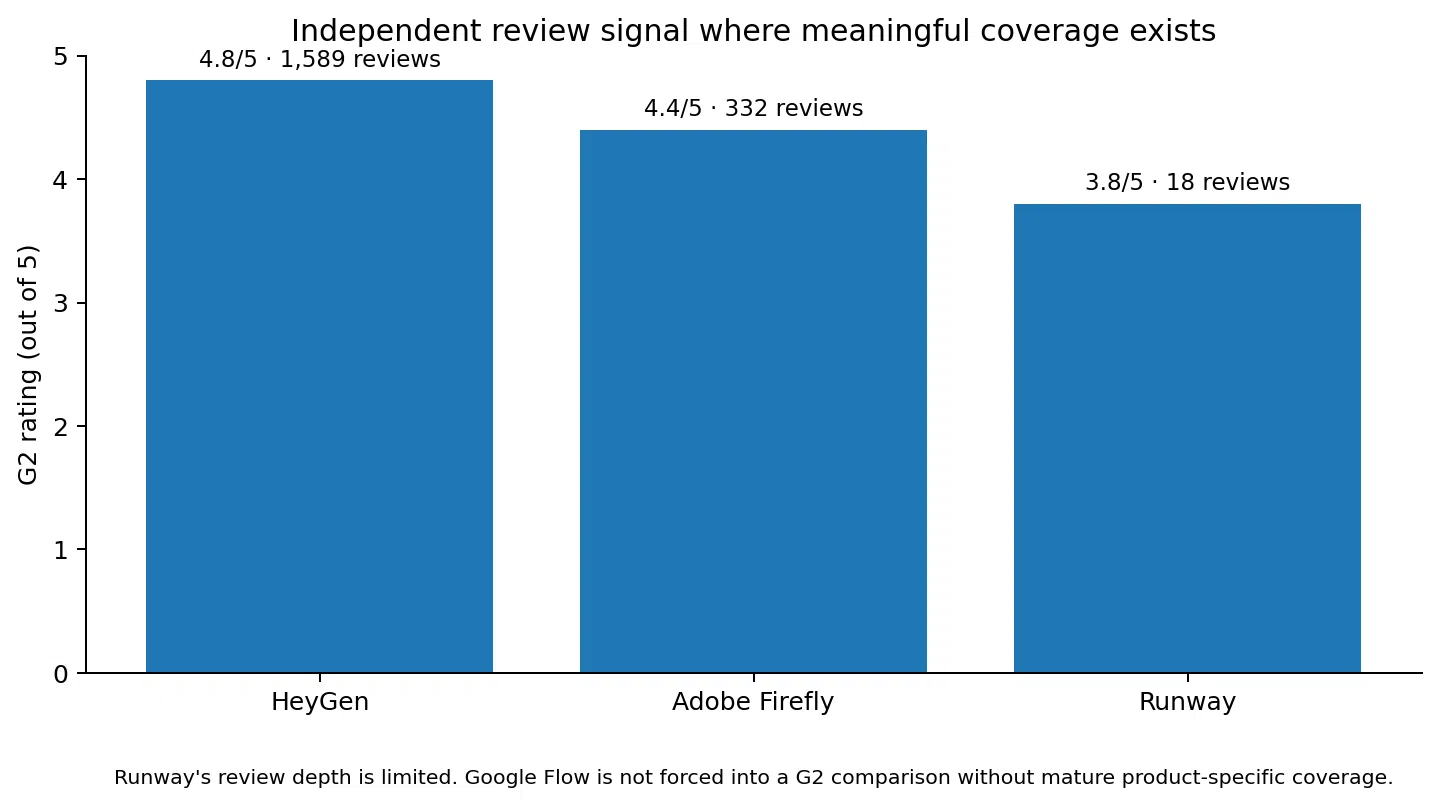
Figure 3. Current G2 signal where meaningful product-specific coverage exists. Review depth should be considered alongside the rating.
Google Flow: best when the video begins as a visual world
Google Flow is designed around visual ideation and filmmaking. Its current Flow product page includes Veo 3.1, text-to-video, frames-to-video, Ingredients to Video, scene building, characters, agent support and editing functions. Google also offers free Flow credits, while paid Google AI tiers increase monthly credits, model access and upscaling.
Social Scion assessment: Flow is a strong platform when the business needs to create a visual world, cinematic concept, product moment or sequence of connected scenes. It is not the most natural choice when the repeated job is a founder explainer, sales personalization or multilingual presenter video.
Runway: best when the team wants model choice and production control
Runway is becoming a platform partly because it is no longer asking users to bet on one model. Its current pricing page shows paid access to multiple Runway and partner models, 4K upscaling, asset storage, voice tools on higher plans and studio-grade formats on Max.
Runway Standard is currently $15 per month, or $12 per month with annual billing, and includes 625 monthly credits. The free plan offers 125 one-time credits.
The Runway G2 profile currently shows 3.8/5 from 18 reviews. That is too small a sample to call a dependable market consensus. Recent positives mention ease, speed and creative quality, while negatives mention credits, inconsistent generations and cost.
Social Scion assessment: Runway is best when shot creation, model flexibility, VFX-style transformation and visual production are the hard parts of the workflow.
Adobe Firefly: best when AI has to sit inside a commercial creative system
Adobe Firefly behaves like a platform because video generation is not isolated from the rest of the creative process. The current Firefly feature and plan page includes image, video and audio generation, partner models, translation and handoff into Adobe creative tools.
Firefly Standard is currently US$9.99 per month with 2,000 generative credits. Adobe says that plan can generate up to 20 five-second videos on the plan configuration shown on its main feature page, while other video-specific Adobe pages can show different model-equivalent counts. Check the live plan before purchase because credit consumption depends on the model.
The Adobe Firefly G2 profile currently shows 4.4/5 from 332 reviews. Review themes repeatedly praise speed, ideation and Adobe integration. The common limitation is precision: complex prompts and fine details can require more iterations or manual finishing.
Social Scion assessment: Firefly is strongest when a marketing team already lives in Adobe and wants AI creation to feed directly into professional design and editing rather than create another disconnected subscription.
HeyGen: best when the platform has to scale a person, message or language
HeyGen represents a different platform model. Its strength is not primarily cinematic generation. It is repeatable business communication built around identity, avatars, Video Agent, localization and team workflows.
The current HeyGen pricing page offers three free videos per month. Creator costs $29 per month and includes 600 credits, videos up to 30 minutes, 1080p export, voice cloning and 175+ languages and dialects. Business costs $149 per month plus $20 per additional seat and adds collaboration, centralized brand controls, LMS integrations and connections to tools including n8n, Make, HubSpot and Zapier.
That last set of features is important. Collaboration, integrations, reusable digital twins and localization are the kinds of capabilities that turn video from a creative task into an operating workflow.
Social Scion assessment: HeyGen is a strong platform when the repeated production problem is the human presenter, translation or business communication. It is less suited to a brand whose primary need is high-end cinematic scene generation.
The Myth: One Platform Should Replace Every Video Tool
The phrase platform can create the expectation that one subscription should do everything. That is not always the best outcome.
A small business may use Flow or Runway for cinematic footage, Descript for spoken-video editing, Canva for simple format adaptation and its existing CMS for publishing. That can still be a cleaner workflow than forcing one platform to handle jobs it was not designed for.
The better test is not how many feature boxes the product checks. It is how many handoffs it removes without making the final result worse.
A platform earns its place when the twentieth video is easier than the first because the team can reuse source material, templates, identity, brand decisions, localization, roles and review steps.
How to Evaluate an AI Video Creation Platform in One Real Project
1. Choose one repeated video job
Do not test with a random cinematic prompt. Pick a task you expect to repeat: monthly founder update, product launch ad, real estate listing, customer onboarding, multilingual explainer, training module or social campaign.
2. Start with the actual source material
Use the real website, script, deck, product image, founder recording, brand assets or customer-approved information the team would use in production.
3. Time the planning stage
Measure how long it takes to get from the source to an approved outline, storyboard or scene plan. This exposes whether the platform reduces planning friction or only generation friction.
4. Generate the first usable version
Count generations, not only minutes. A fast render that needs five attempts may be slower than a more controlled workflow.
5. Track the corrections
Record caption fixes, product corrections, identity drift, pacing changes, B-roll replacement, audio changes, subtitle issues and any part that must leave the platform to be fixed.
6. Create a second format or language
A platform should prove its value when the asset has to change. Make a vertical version, translate it, create a shorter cut or adapt the same source for another customer stage.
7. Add a second collaborator
If the business expects collaboration, test commenting, review, templates, roles and version control before buying the team plan.
8. Complete the real handoff
Publish or export the asset exactly where it will be used. Test the file quality, captions, aspect ratio, metadata and any integration required.
9. Calculate total production cost
Include the subscription, credits, failed generations and human time. Compare that with the current way the business makes the same video.
10. Decide what the platform should own
The platform does not need to own every production step. Define the part it is best at, then keep the rest of the stack intentionally small.
Practical Prompt: Test a Platform Before You Buy It
|
Use one real workflow, not a feature checklist Evaluate the AI video creation platform against the verified business workflow below.Score the platform from 1 to 5 on:1. BRIEF INPUT: Can it start from our real source material?2. STORYBOARD: Can we approve scene logic before generation?3. GENERATION: Does it create the visual or presenter format we need?4. EDITING: Can we correct the result without rebuilding it elsewhere?5. CONTROL: Can we protect product, identity, brand and approved facts?6. SCALE: Can we localize, reuse templates, collaborate or automate?7. HANDOFF: Can the final asset move cleanly into our real publishing channel?For every score, explain the evidence from our test.Do not award points for features we did not use.Then calculate:- time to first publishable asset- number of failed generations- correction time- number of external tools still required- approximate cost per approved asset- what bottleneck the platform genuinely removedEnd with one of three recommendations:KEEP FREE TIERUPGRADEDO NOT ADD TO STACKVerified workflow: [paste business workflow]. |
When Should a Small Business Pay for an AI Video Creation Platform?
Upgrade when the workflow, not the demo, has proved its value.
- The same video job repeats often enough that reusable templates, identities or workflows save real time.
- The platform eliminates at least one paid handoff such as editing, localization, reshoots, external B-roll or format adaptation.
- The team needs higher resolution, more model access, more credits or faster processing to complete an already-proven workflow.
- Collaboration, roles, review or brand controls are becoming necessary as more people touch the asset.
- Localization or translation is opening a real market or reducing repeated production work.
- The business can estimate cost per approved asset rather than only subscription price.
Stay on free or low-tier access when the format itself is still uncertain. There is no advantage in buying a platform before the business knows which video job it needs the platform to repeat.
Common AI Video Creation Platform Mistakes
Buying because the platform has the newest model
Models change faster than business workflows. Buy the system around the model only if the workflow remains useful when a newer model appears.
Assuming platform means one-click
The more complete the platform, the more decisions it may expose. A good system can reduce handoffs without removing the need for creative judgment.
Ignoring the cost of corrections
Credit pricing can look inexpensive until identity drift, product errors or failed generations require repeated attempts.
Testing with a vendor template instead of your real source
A polished template proves the template works. It does not prove the platform can handle your product, founder, script or brand constraints.
Treating collaboration as an enterprise-only concern
Even a two-person business needs clean review once a founder and creator are both editing the same asset.
Using synthetic identity without a permission workflow
A platform may make digital twins easy to create. The business still needs clear consent, script approval and usage boundaries.
Letting the platform invent the business proof
The tool can shape the presentation. Customer outcomes, prices, product behavior, reviews and founder history should come from verified sources.
Adding the platform without removing anything else
A new platform should replace or reduce a real production step. If it only adds another dashboard, the stack is becoming heavier.
FAQ: AI Video Creation Platform in 2026
What is an AI video creation platform?
It is a software environment that supports several stages of AI-assisted video production, such as planning, generation, editing, avatars or voice, brand control, localization, collaboration and export.
How is an AI video creation platform different from an AI video generator?
A generator mainly creates footage or clips. A creation platform is designed to carry more of the workflow from source material or brief toward a finished, reusable and publishable business asset.
What is the best AI video creation platform?
There is no universal best platform. Google Flow fits filmmaker-style scene creation, Runway fits multi-model cinematic production, Adobe Firefly fits Adobe-centered commercial creative, and HeyGen fits identity-first business video, localization and repeat communication.
Which platform is best for small business?
For a founder-led business that needs explainers, multilingual video or repeated presenter content, HeyGen is a strong fit. A product or lifestyle brand that needs cinematic generated scenes may fit Runway or Flow better.
Is there a free AI video creation platform?
Yes. Flow offers free credits, Runway offers 125 one-time free credits, Firefly provides limited free daily generations, and HeyGen allows three free videos per month. Free access is best used to test a real workflow.
How much does an AI video creation platform cost?
Entry paid plans can start below $10 per month for some creative platforms and rise substantially for team, high-volume or enterprise use. Total cost depends on credits, model choice, duration, corrections and collaboration needs.
Which platform has the strongest independent review evidence?
Among the platforms compared here, HeyGen has the deepest G2 review base at 1,589 reviews on the current product profile. Adobe Firefly also has meaningful coverage at 332 reviews. Runway's current G2 review base is much smaller.
Can an AI video platform replace a production agency?
It can replace or reduce specific production tasks. It does not automatically replace story development, customer research, creative direction, proof selection, campaign strategy or the judgment required to decide what the business should say.
Should I choose a platform with many AI models?
Model choice is useful when different shots require different strengths. It is only valuable if the platform also makes it easy to plan, compare, edit and finish those outputs inside a coherent workflow.
What should I measure during a free trial?
Measure time to a publishable asset, failed generations, correction time, external tools still required, localization or format adaptation time and approximate cost per approved video.
The 2026 Stance: The Platform Should Make the Workflow Smaller
AI video is adding more capability every month. That can create the illusion that a better stack needs more tools.
The opposite should be the goal.
A useful AI video creation platform makes the workflow smaller. It removes repeated briefing, unnecessary exports, manual localization, disconnected editing, duplicate versions and avoidable reshoots. It gives the team a place to reuse what should stay consistent.
What it should not remove is the part the customer is trusting.
The business still needs to know the human story, customer problem, product truth, proof and next action before the platform starts generating around them.
The model can change. The platform can change. The story system should survive both.
Choose the Story Before You Choose the Platform
Most businesses already have stronger source material than the AI platform can invent: customer language, founder perspective, product truth, real proof and moments the market does not understand yet.
Social Scion AI starts there, then chooses the cinematic, avatar, product, UGC or AI-native production workflow around the story job.
|
Get your Free Film See what happens when the real business story becomes the source before the AI video creation platform is chosen. Claim the Free Film Story that attracts. System that converts. |



0 conversations