A verified script still needs human judgment when it becomes scenes, voice and captions.
A finished script feels like the safest point in a technical video project. The facts are approved, the terminology is settled, and the next action is clear. Then a script-to-video AI turns one precise sentence into an impressive scene that quietly changes what the sentence means.
That is the adoption question for an expert-led business. The tool may assemble a video quickly, but can it preserve the claim, causal logic, specialist language, voice, continuity and buyer action? For technical explainers, fidelity is not a polishing step. It is the production standard.
|
Key takeaways
|
What script to video AI actually does
Script-to-video AI converts a written source into scenes, narration, visuals, captions and often a presenter or avatar. Some systems start with a pasted script. Others accept a topic, URL, PDF or deck and draft the script before assembling the video. The category differs from prompt-to-video generation because the source narrative is longer, ordered and intended to survive across multiple shots.
The output remains an interpretation. A tool decides where one scene ends, which visual represents each sentence, what the voice emphasizes and how the ending is framed. A technically correct script can therefore produce a visually misleading film without changing one line of copy.
Script fidelity is the degree to which the final video preserves the approved meaning, evidence, terminology, tone, continuity and intended buyer action of the source script.
The market promise is speed but the owner risk is translation
Current vendor pages illustrate the assembly promise. HeyGen says a user can paste a script or upload a file, choose a presenter and voice, adjust visuals and captions, then generate an export. VydioFlow describes a workflow that maps a script to scenes and lets the user regenerate a weak scene. These are useful capabilities, but they do not decide whether a scene is true enough for a buyer to trust.
No directly relevant development from the last five calendar days materially changed that decision. The practical baseline remains: AI can shorten assembly time, while the business still owns factual accuracy, visual implication, permissions and release approval.
A common misconception is that readable captions prove the script survived. Captions show only that the words were carried forward. Fidelity fails when the picture implies an unverified dashboard, the voice changes a technical term, a character changes between scenes, or the ending asks for an action the service cannot support.
The six pass script to scene fidelity review
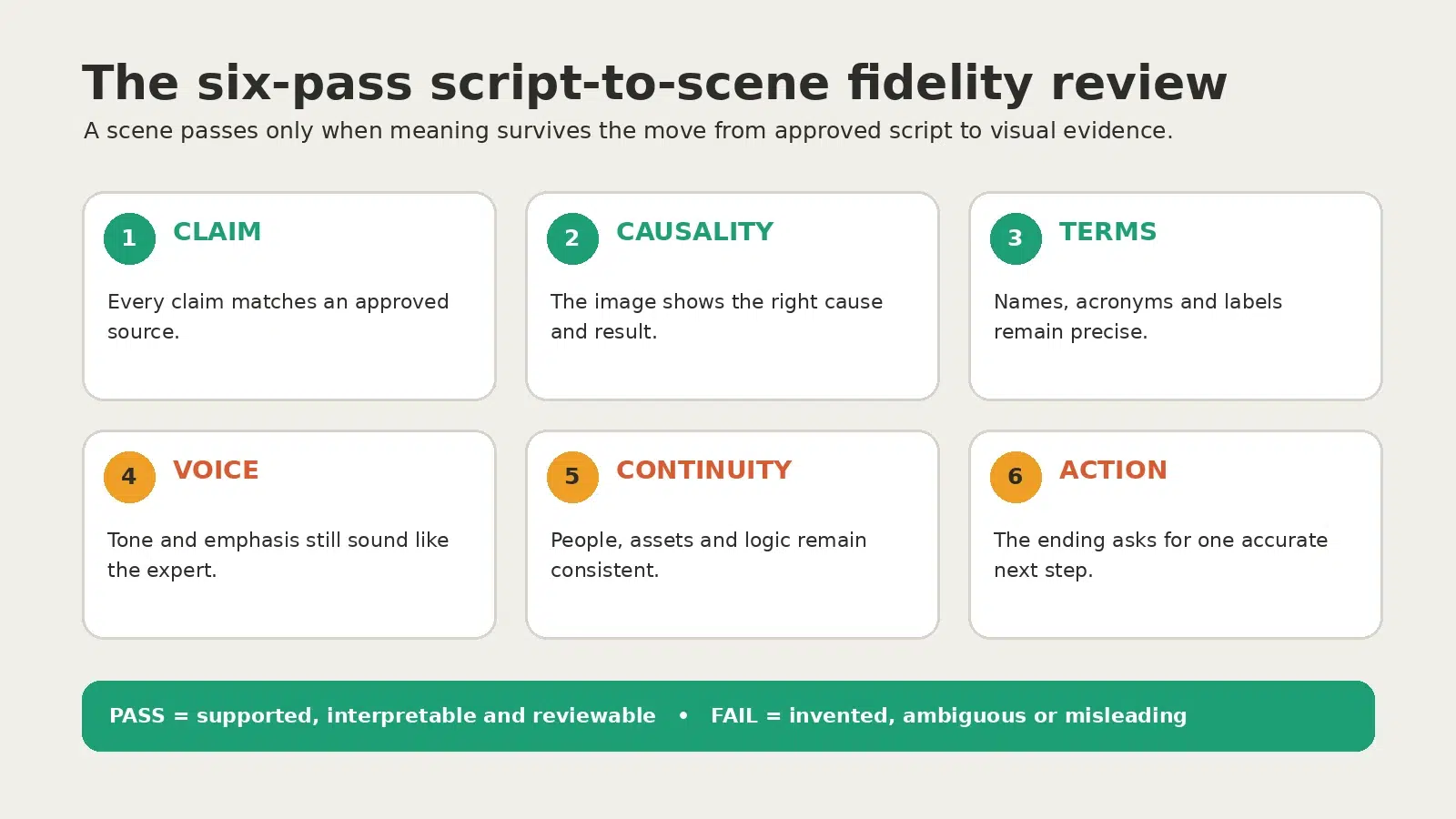
Figure 1. Review meaning in six passes before the final render is approved.
1 Claim
Match every factual statement to the approved script and a named source. If the scene adds an outcome, number, client type or product behavior, it needs its own evidence.
2 Visual causality
Check that the image shows the same cause and consequence as the narration. A server room beside a line about response time may imply infrastructure ownership or monitoring that is not part of the service.
3 Terminology
Verify product names, acronyms, labels, pronunciation and on-screen words. Technical audiences notice a wrong port, interface label or service term before they notice cinematic polish.
4 Voice
Listen for emphasis, pace and confidence. A synthetic voice can read the right sentence but stress the wrong phrase, turning a measured explanation into a guarantee.
5 Continuity
Track people, wardrobe, objects, locations, diagrams and logic across scenes. Continuity is not cosmetic when the viewer relies on it to understand a process.
6 Final action
Confirm the ending asks the buyer to take one accurate next step. The action should follow from the explanation, not arrive as a generic sales demand.
A pass fail table for scenes that look like real infrastructure
The closer a generated scene looks to documentary evidence, the stronger the proof requirement. Use this table before approving any visual that could be mistaken for an actual client environment, interface or operating result.
|
Scene type |
Pass when |
Fail when |
Owner |
|---|---|---|---|
|
Service process |
Sequence matches an approved process. |
Invented steps, timing or handoffs. |
Service lead |
|
Dashboard or UI |
Official screenshot or labelled illustration. |
Generated interface presented as real. |
Product owner |
|
Facility or network |
Illustrative context with no ownership claim. |
Image implies a real site or capability. |
Technical reviewer |
|
Customer outcome |
Consented, attributable proof with caveat. |
Composite success scene treated as evidence. |
Account owner |
|
Security or compliance |
Exact approved language and source. |
Visual suggests unverified certification. |
Compliance owner |
|
Final action |
One feasible next step tied to the explainer. |
Guarantee or unsupported urgency. |
Commercial owner |
Decision rule: when a realistic scene cannot be sourced, verified or clearly framed as illustrative, replace it with a simpler explanatory visual.
Choose the smallest visual route that can carry the truth
|
Route |
Best fit |
Strength |
Main tradeoff |
|---|---|---|---|
|
Presenter-led |
Stable expert explanation or training. |
Consistent delivery and localization. |
Can feel generic when trust depends on the real expert. |
|
Faceless |
Process, product or infrastructure explanation. |
Real screenshots and diagrams can carry proof. |
Stock-style scenes can imply false details. |
|
Hybrid |
Buyer explanation where trust and proof both matter. |
Human framing with an evidence-rich middle. |
More review points and assets. |
Choose presenter-led when the message is stable and the speaker format is appropriate. Choose faceless when the product, process or evidence should remain the focus. Choose hybrid when a human trust carrier must frame the story but real proof needs to occupy the middle.
Build a technical explainer in eight controlled steps
- Name one buyer question. Write the uncertainty the film should remove and the next action the viewer should understand.
- Lock the source script. Mark each claim as verified, illustrative or prohibited. Assign a source owner.
- Split the script into visual beats. Give each sentence one job: orient, explain, demonstrate, prove, qualify or direct.
- Write a scene evidence note. State whether each visual is real, approved, illustrative or still needs a source.
- Choose presenter-led, faceless or hybrid by the story job and proof burden, not by the most impressive demo.
- Create a low-cost storyboard. Review scene order, causality and terminology before high-fidelity rendering.
- Run all six fidelity passes. Separate technical, permission and commercial reviewers where ownership differs.
- Review without sound, audio-only and with captions. The same core meaning should survive every mode.
Example an MSP turns an incident response FAQ into a 60 second explainer
A managed service provider wants to answer a prospect question: “Who owns the incident when several vendors are involved?” Its approved script explains intake, triage, escalation and communication. The first AI storyboard shows a polished monitoring dashboard with live severity scores. The image looks credible, but the MSP does not use that interface and the scores are invented.
The technical reviewer rejects the scene. The revision uses a clearly illustrative handoff map supported by the provider’s documented process. A real principal records the opening and closing, while the middle shows approved terms and nonliteral motion. The story becomes less spectacular and more believable. That is a fidelity gain.
This is an illustrative scenario, not a client outcome. Any real dashboard, testimonial or result would require direct source approval.
Use this 15 minute script to scene worksheet
- Buyer question: What uncertainty should the viewer stop carrying?
- Approved answer: What can the business responsibly say in one sentence?
- Proof: Which document, demonstration, expert or client-approved source supports it?
- Scene job: What must the viewer understand from this beat?
- Visual status: Is it real, sourced, illustrative or [NEEDS SOURCE]?
- Risk: What might a reasonable buyer infer that the script does not claim?
- Owner: Who approves accuracy, rights and final release?
- Action: What one next step is useful after the explanation?
Reusable AI review instruction: Compare this storyboard with the approved script. Flag any scene that changes a claim, causality, terminology, voice, continuity or action. Do not invent names, quotes, dates, metrics, motivations, customer details or outcomes. If evidence is missing, mark it [NEEDS SOURCE] instead of filling the gap.
When to stay manual and when a platform earns its place
Stay manual when the script is short, the visuals are mostly real screenshots or diagrams, and one editor can assemble the film without repeated variants. A specialist script-to-video tool becomes worthwhile when scene mapping, presenter consistency, localization or frequent revisions create a real bottleneck. A broader platform makes sense when teams need shared assets, permissions, version control and several outputs from the same approved source.
Before buying, verify scene-level editing, export ownership, voice and likeness terms, uploaded-data handling, team permissions, caption control, pronunciation tools, project portability and the cost of repeated generations. Test the same 30-second sequence in every candidate. Compare the time required to reach approval, not the time to produce the first render.
Do not pay for generative breadth when the problem is approval discipline. A large model library cannot substitute for named evidence, an editable storyboard and a reviewer who understands the service.
Mistakes that make a correct script misleading
Approving the script but not the storyboard. The words may stay accurate while images introduce a false environment, sequence or outcome.
Letting realism stand in for evidence. A convincing generated dashboard is still not a real product interface.
Reviewing every issue in one pass. Factual, visual, voice and continuity errors compete for attention.
Using the same scene for several claims. One generic visual flattens causality and makes distinct ideas interchangeable.
Treating pronunciation as cosmetic. A wrong technical term can damage credibility faster than a synthetic scene.
Generating channel versions too early. Every cut multiplies review work before the source story passes.
Ending with a generic sales CTA. The action feels disconnected from the buyer question.
Frequently asked questions
What is script to video AI?
It turns a written source into a planned sequence of scenes, narration, visuals and captions. It may also draft the script from a topic, URL or file, so the business must decide which version is authoritative.
Is script to video AI the same as text to video AI?
No. Text-to-video usually generates a short clip from a prompt. Script-to-video handles a longer ordered narrative across several scenes, voice and captions.
Can a tool make a complete technical explainer from one script?
It can make a draft. A publishable explainer still needs approved evidence, storyboard review, terminology checks, continuity, rights review and human release approval.
How do I stop AI from inventing dashboards or infrastructure?
Use approved screenshots where possible. Otherwise specify a clearly illustrative diagram, prohibit fake interfaces and assign a technical reviewer.
Should an expert appear on camera?
Only when the real person carries trust that an avatar or voiceover cannot. A hybrid route often lets the expert frame the story while proof explains the middle.
How should I compare script-to-video tools?
Run the same short script through each tool and score claim fidelity, editability, terminology, voice, continuity, export rights and review time.
What should I approve first?
Approve the source script, then the scene-by-scene storyboard. High-cost rendering begins only after both pass factual and visual review.
Social Scion’s stance
The tool should translate expertise, not rewrite it. Human creative intelligence decides what is true, what the buyer needs to understand, which visual can responsibly carry the claim and where a specialist must approve the result. AI expands production capability after that judgment is in place.
For an expert-led business, the most valuable system is not the one that produces the most scenes. It is the one that makes each scene easy to trace, challenge, revise and approve.
Get your Free Film
See what your real business story could become. Get your Free Film



0 conversations