Written by Dev, Co-Founder of Social Scion AI
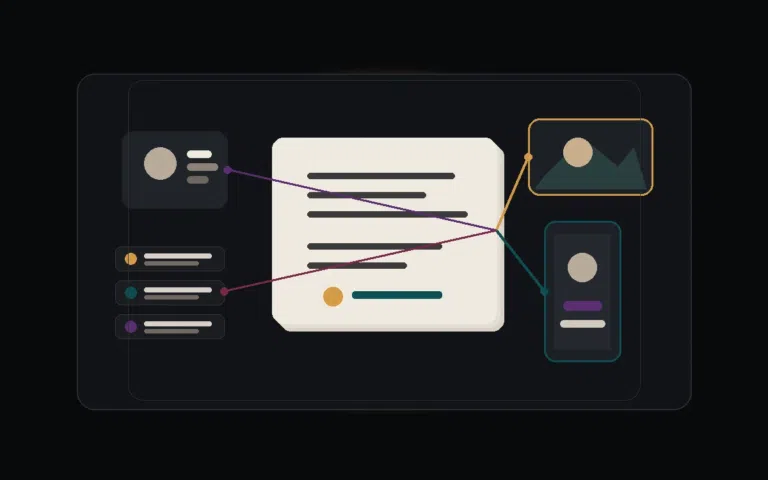
Featured image: a warm editorial ad-production workspace comparing product source material, story structure and AI-assisted video output.
Key Takeaways
|
|---|
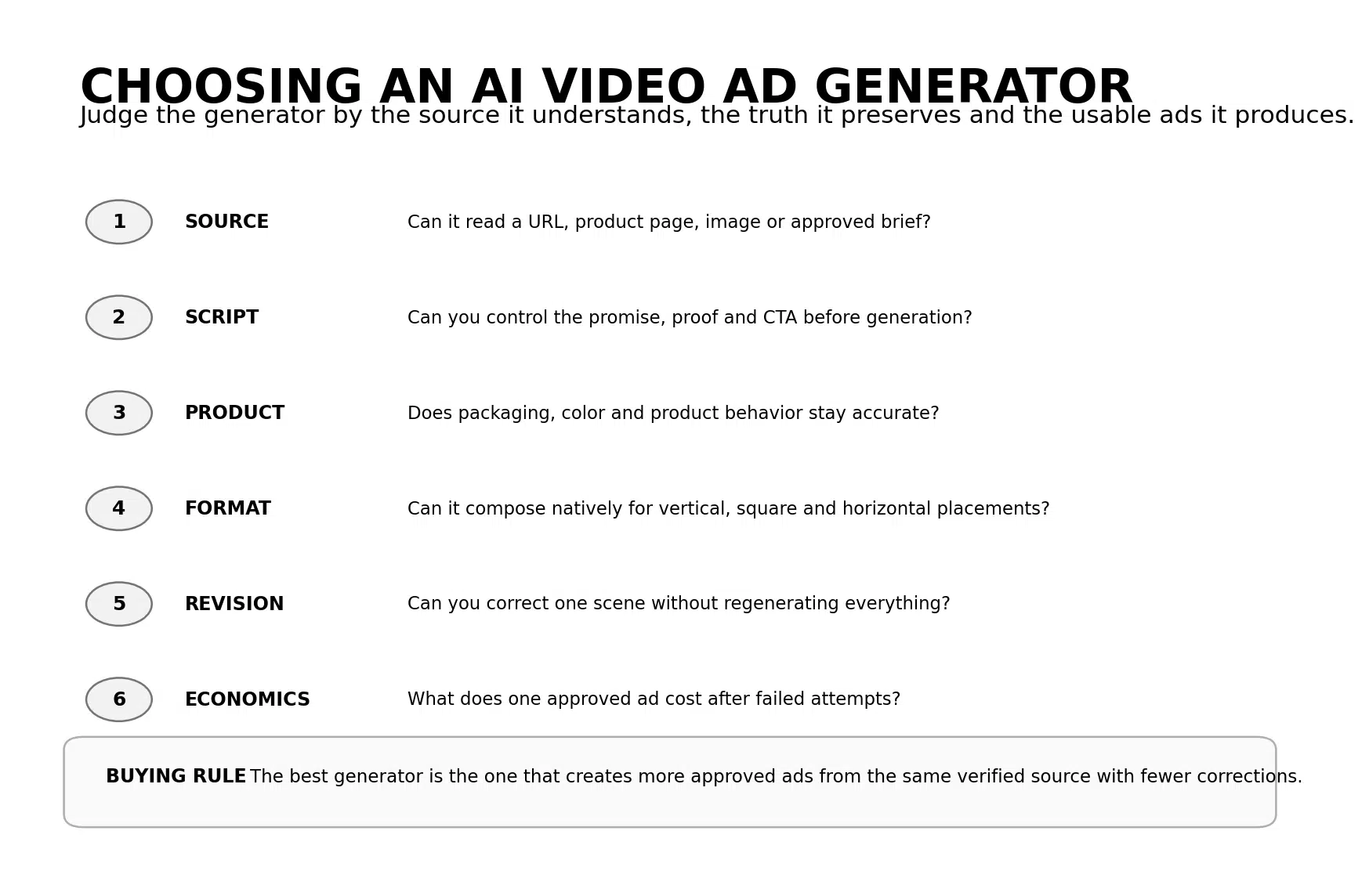
Figure 1. Six tests for choosing an AI video ad generator.
AI Video Ad Generators Are Moving Inside the Campaign Workflow
The biggest change in AI ad generation is not that models can make better footage. It is that the generator is moving closer to the media system where the ad will run.
On August 27, Google made Multimodal Video Creation generally available in Demand Gen. Advertisers can now move from storyboarding to horizontal and vertical assets inside Asset Studio, then use those assets across Demand Gen inventory.
TikTok is taking the same idea further inside its own creative environment. Symphony Agent can take a product image, trend, template or reference video, turn the source into a structured storyboard and generate a finished TikTok-style video. TikTok says users can edit storyboards, scenes, voiceovers, tone and calls to action throughout the workflow.
TikTok's August update also integrated Dreamina Seedance 2.5 into Symphony, extending video generation to as much as 30 seconds and allowing up to 50 multimodal references. That matters for advertisers because product images, brand footage, audio and reference videos can all carry more of the source truth into generation.
Creatify has been designed around the same source-to-ad problem from the beginning. Its AI Video Ads workflow can turn a product URL into a video ad, while also allowing manual source assets when a URL is unavailable.
This changes the buying question. A business no longer needs to ask only, 'Which generator makes the most realistic video?' The better question is, 'Which generator understands our source material well enough to produce more usable ads with fewer corrections?'
What Is an AI Video Ad Generator?
An AI video ad generator is software that uses artificial intelligence to turn product, service or campaign inputs into promotional video assets. Inputs may include a product URL, product images, brand footage, scripts, reference videos, customer-approved information or a structured marketing brief.
The generator may create the script, presenter, voice, product scenes, captions, music, B-roll, edit and platform-specific versions.
A generator becomes useful to a business when it reduces the distance between approved source material and a publishable ad.
AI video ad generator vs. AI video generator
A general AI video generator is optimized to create footage from text or visual references. An AI video ad generator adds advertising structure around that footage, such as product extraction, ad scripts, templates, calls to action, avatars, campaign formats and launch workflows.
AI video ad generator vs. AI video ad platform
A generator focuses on producing the asset. An ad platform may also manage inspiration, creative testing, analytics, publishing or media activation. Creatify, TikTok Symphony and Google Demand Gen are moving toward this broader platform behavior.
The Source-to-Ad Workflow
The generator should enter the process after the product truth and brief are clear.
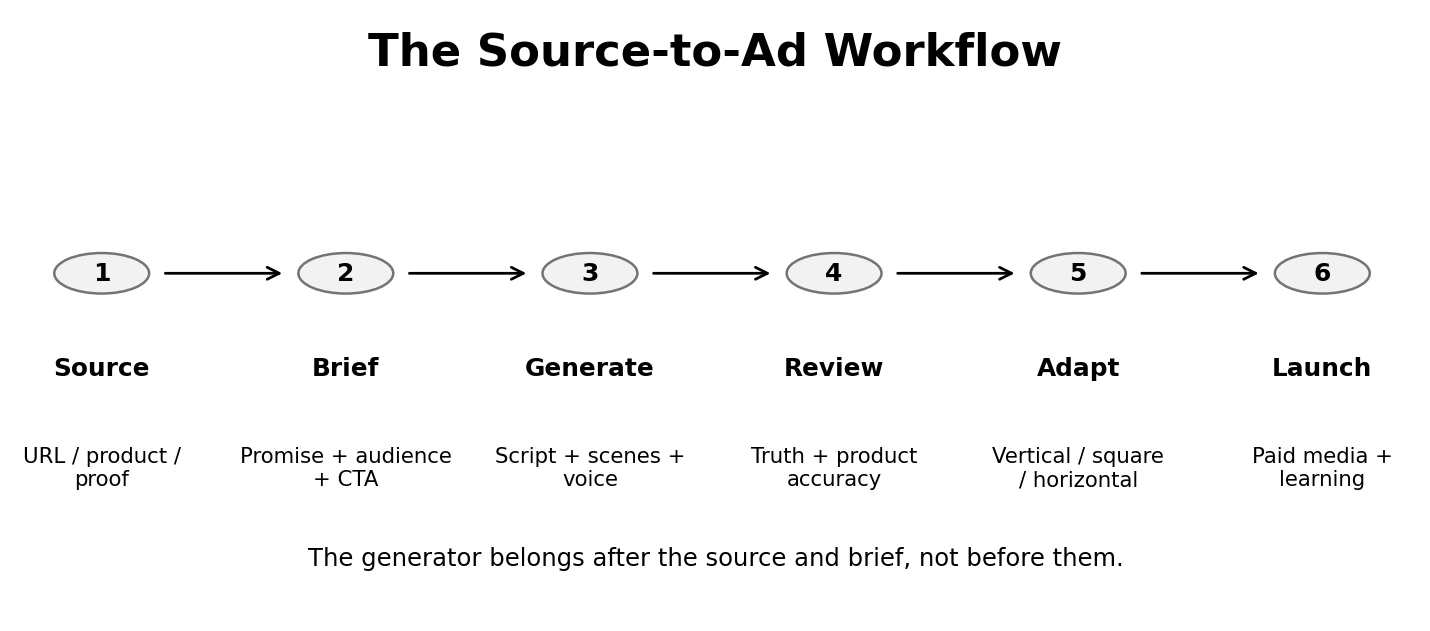
Figure 2. The Source-to-Ad Workflow keeps verified source material ahead of generation.
1. Source: give the generator reliable material
Use the actual product page, approved images, real customer language, verified product facts and existing brand assets. Weak source material creates more room for the model to guess.
2. Brief: lock the promise before generation
Define the customer problem, the one belief the ad should create, the proof, the offer and the CTA. A generator can help write the script, but it should not decide what the business is promising.
3. Generate: let AI assemble the execution
This is where the tool earns its place. It can create product shots, avatars, voiceover, captions, B-roll, transitions, music and alternate scene versions.
4. Review: protect product truth
Check packaging, labels, colors, sizes, ingredients, prices, product behavior, testimonials and any claim the customer may treat as evidence.
5. Adapt: compose for the placement
A vertical ad should be built for vertical, not treated as a crop of the horizontal master. The important product detail, face and CTA must survive each format.
6. Launch: use the campaign to create learning
Track the business action the ad was built to create. Save the winning hook, proof, format and source structure so the next generation begins smarter.
|
The generator rule The AI can invent the execution. It should not invent the evidence. |
|---|
6 Tests for Choosing the Right AI Video Ad Generator
1. Source Test: can it understand the material you already own?
The best generator is often the one that requires the least retyping.
For an ecommerce business, that may mean reading a product URL. For a service business, it may mean accepting a structured brief, images and existing video. For a founder-led offer, it may mean using approved scripts and brand footage.
Creatify is strong here because URL-to-video is one of its core workflows. TikTok Symphony can start from product images, brand information, references and platform trends. Google Demand Gen can build from existing campaign assets inside Asset Studio.
2. Script Test: can you lock the claim before the visuals?
A generator should make script development faster without turning the business promise into a black box.
Look for scene-level script control, the ability to edit the hook, proof and CTA, and a clear way to approve the words before expensive rendering. If the system changes the product promise every time it regenerates a visual, the workflow is unstable.
3. Product Fidelity Test: does the product stay recognizable?
This is one of the most important differences between a marketing generator and a general visual generator.
Packaging, color, proportions, logos, texture and product behavior may all become buying evidence. TikTok's Symphony integration with Seedance emphasizes consistency across reference-driven production. The more the generator can use real source assets directly, the less product correction should be required.
Test this before buying a larger plan. Use the product with the hardest details, not the easiest hero image.
4. Format Test: can it create native ad versions?
An ad generator should understand that 9:16, 1:1 and 16:9 are different compositions, not only different crops.
Google's Demand Gen workflow now creates horizontal and vertical assets inside the campaign environment. TikTok Symphony is optimized around TikTok-native behavior. Creatify can produce multiple ad formats and variations from the same source.
The real test is whether the product, presenter, captions and CTA still look intentional in each format.
5. Revision Test: can you fix the scene instead of starting over?
AI generation becomes expensive when every correction requires a full regeneration.
Look for scene-level edits, script revisions, voice changes, asset replacement and a way to preserve the parts that are already approved. Creatify's current billing model even separates revisions from initial renders for standard tools, which makes revision economics visible.
6. Economics Test: what does one approved ad cost?
Do not calculate cost from the subscription alone.
Creatify currently prices Starter at $39 per month with 100 credits and Pro at $99 with 300 credits. Its credit guidance says standard Video Ads use five credits for every 15 seconds, while revisions use three credits for every 15 seconds. More advanced tools such as Agent and Ad Flow use variable credits based on prompt complexity and generation attempts.
That means one 15-second ad that works on the first render has a very different economics profile from one that needs five attempts and several revisions.
Track approved ads per month, not generations per month.
4 AI Video Ad Generators Worth Comparing in 2026
These tools solve different source-to-ad problems. They should not be ranked as though they are identical.
|
Generator |
Best for |
Current access or pricing |
Review signal |
Source strength |
Main tradeoff |
|---|---|---|---|---|---|
|
Google Demand Gen + Asset Studio |
Advertisers already buying Google visual media |
No separate creative subscription inside Google Ads |
Platform feature, not standalone G2 software |
Existing campaign assets, storyboard-to-video and multi-format creation |
Most valuable inside Google campaign workflows |
|
TikTok Symphony |
TikTok-native ads and trend-led execution |
Free creative tool for TikTok for Business users |
Platform suite, not standalone G2 software |
Product images, brand info, trend references, templates and reference videos |
Optimized for TikTok rather than broad cross-platform production |
|
Creatify |
Product URL-to-video and high-volume ad creation |
Free 10 credits; Starter $39/month; Pro $99/month |
G2 4.8/5 · 1,707 seller reviews |
Strong product URL ingestion, assets, actors, templates and ad flows |
Credits and advanced dynamic workflows can add up |
|
HeyGen |
Presenter-led ads, digital twins and multilingual explanation |
Free 3 videos/month; Creator $29/month |
G2 4.8/5 · 1,967 seller reviews |
Strong scripted presenter, avatar, digital twin and localization inputs |
Less specialized for product URL-to-ad automation |
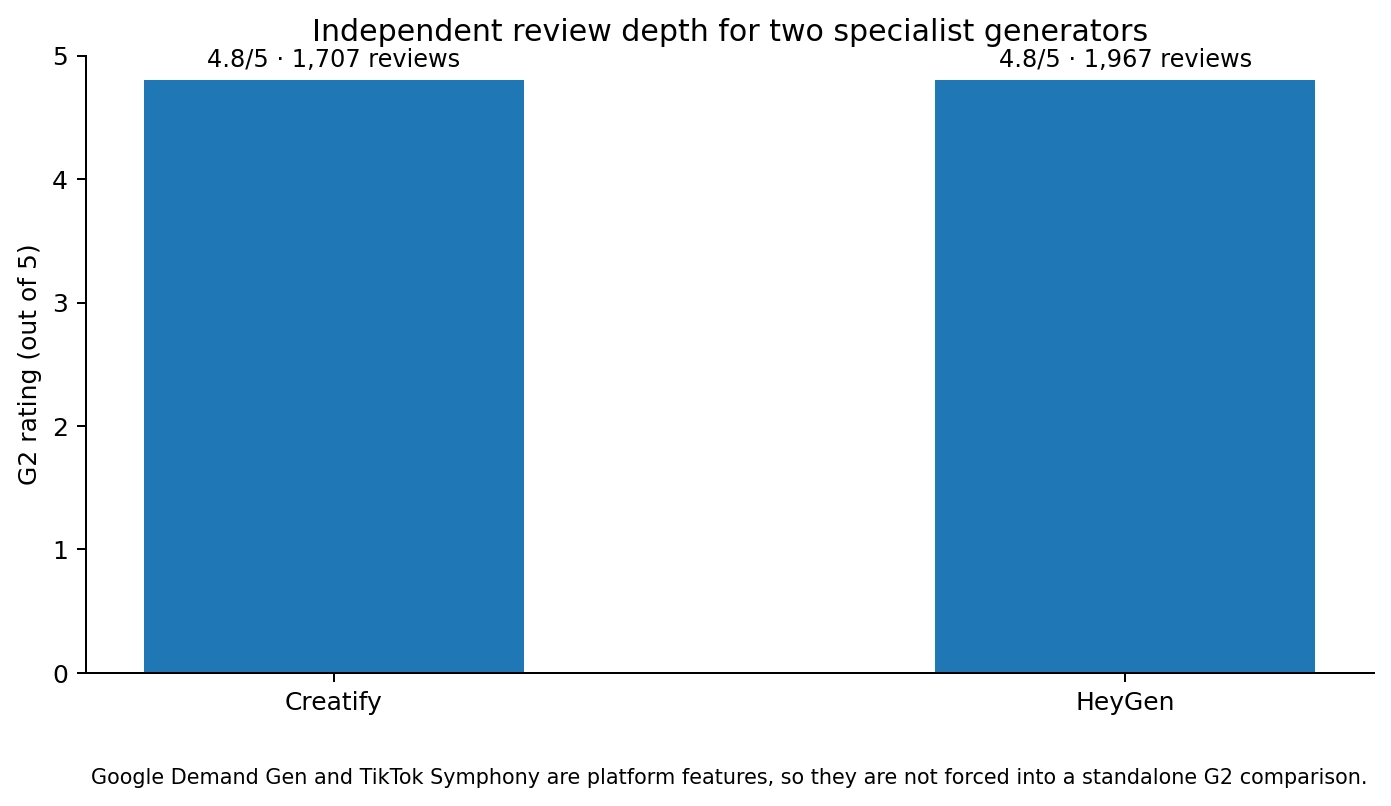
Figure 3. Mature independent review depth for two specialist video-generation platforms.
Google Demand Gen: best when generation should happen inside paid media
Google is the most natural option when the business already runs Demand Gen and needs more video coverage without adding a separate production platform. The August 27 release makes storyboarding and multi-format generation part of Asset Studio.
Social Scion assessment: use it after the campaign proposition is approved. Let Google adapt the asset for inventory. Do not let the media platform become the place where the business decides its story.
TikTok Symphony: best when the creative has to feel native to TikTok
TikTok Symphony combines platform signals with generation. TikTok's August 2026 Symphony Agent documentation says the system can generate a 15-second ad in about five minutes, use top ad trends and templates as references, and let advertisers edit storyboards, scenes, voiceovers, tone and calls to action.
Social Scion assessment: strong for channel translation. Keep the business truth fixed and let Symphony handle TikTok rhythm, structure and creative cues.
Creatify: best when the product page is the source
Creatify is the most direct answer to the keyword because URL-to-ad is a core product workflow.
Its current pricing page includes 10 free monthly credits, Starter at $39 with 100 credits and Pro at $99 with 300 credits. Starter includes Creative Agent, all creation tools, 300 AI actors, 200+ ad templates and 50+ premium models. Pro expands those limits substantially.
The Creatify G2 seller profile currently shows 4.8/5 across 1,707 reviews. Review themes repeatedly praise speed, ease of use and the ability to create ads without a full production team. Credit limitations, cost and the need for final polishing remain common considerations.
Social Scion assessment: choose Creatify when the product, offer and source page are already strong and the repeated problem is ad production volume.
HeyGen: best when the ad depends on a presenter
HeyGen is useful when the product needs explanation from a person, when the founder should appear repeatedly, or when the same message needs localization.
The HeyGen G2 seller profile currently shows 4.8/5 across 1,967 reviews. Users frequently praise realistic avatars, speed and production consistency, while pricing and credit usage remain recurring negatives.
Social Scion assessment: use HeyGen when the human delivery is the ad format. Do not add a presenter to a product-led ad if the product itself should carry the proof.
The Myth: The Best AI Video Ad Generator Is the Most Automated
Automation is useful when the inputs are strong.
A generator that can write the script, choose the presenter, build the scenes, select the music and launch the ad may look more advanced. It can also make it easier to publish something the business never deliberately approved.
The strongest workflow automates the repeatable production decisions and keeps the consequential business decisions visible.
Let AI choose between three caption styles. Do not let it invent the result. Let it produce five product shots. Do not let it change the packaging. Let it suggest hooks. Do not let it decide what the business is promising.
More automation is not the goal. Fewer production bottlenecks are.
How to Test an AI Video Ad Generator in 45 Minutes
1. Choose one real product or offer
Use the product with enough detail to expose model errors. Avoid a generic mockup.
2. Prepare one verified source pack
Include the product URL, hero image, three approved product facts, one proof point, brand colors and the CTA.
3. Generate one control ad
Use the tool's recommended workflow and do not over-engineer the prompt. This tests the product's normal operating experience.
4. Mark every correction
Record wrong product details, weak script lines, irrelevant B-roll, awkward avatars, caption errors and format issues.
5. Make one revision
Change only one scene or claim. Measure whether the tool preserves the approved parts.
6. Create a second format
Build a vertical or horizontal version and check whether the composition survives.
7. Calculate the real cost
Include credits used, failed generations and human correction time.
8. Compare the result with the current workflow
If the generator does not save enough time or create enough new testing capacity, it has not earned the subscription yet.
Practical Prompt: Brief the Generator Without Letting It Invent the Ad
|
Use verified source material only Create a 20-second video ad from the verified source below. LOCK THESE FACTS: Do not invent testimonials, guarantees, scarcity, product capabilities, founder history or customer emotions. Build: Then provide: Verified source: [paste source]. |
|---|
When Should You Pay for an AI Video Ad Generator?
Pay when the source-to-ad job repeats often enough that the generator saves measurable production time or increases controlled testing capacity.
- You repeatedly turn ecommerce product pages into short video ads.
- The same offer needs enough vertical, square and horizontal versions that manual resizing is becoming a bottleneck.
- Presenter-led or multilingual ads are expensive to record repeatedly.
- The paid plan removes a watermark, credit limit, actor limit or format restriction that is already blocking a useful workflow.
- The generator produces approved ads with fewer corrections than your current process.
- The business can calculate cost per approved ad and compare it with manual or agency production.
Common AI Video Ad Generator Mistakes
Feeding the generator a weak product page
If the source does not explain the product clearly, the tool will fill gaps with generic marketing language.
Letting AI write unsupported claims
The generator may produce persuasive copy that exceeds what the product evidence supports.
Ignoring product fidelity
A good-looking product that is the wrong color, size or package is not usable advertising.
Generating one format and cropping it everywhere
Different placements need different compositions and opening behavior.
Counting renders instead of approved ads
A cheap generation that needs repeated correction can be an expensive workflow.
Choosing by avatar realism alone
A realistic presenter is useful only when a presenter is the right ad format.
Buying the biggest plan before testing revisions
The revision workflow often matters more than the first-generation workflow.
Publishing without an owned next step
A good video should send the customer to a product page, lead magnet, booking flow or another destination the business controls.
FAQ: AI Video Ad Generator in 2026
What is an AI video ad generator?
It is software that turns product, service or campaign inputs into promotional video assets using AI. It may generate scripts, scenes, presenters, voice, captions, music and platform-specific versions.
What is the best AI video ad generator?
The best tool depends on the source and channel. Creatify is strong for product URL-to-video, TikTok Symphony for TikTok-native creative, Google Demand Gen for Google campaign workflows and HeyGen for presenter-led or localized ads.
Can I generate a video ad from a product URL?
Yes. Creatify's AI Video Ads workflow can analyze a product URL and turn the product information into video ad concepts. It also supports manual assets when a product URL is unavailable.
Can Google generate video ads with AI?
Yes. Google made Multimodal Video Creation generally available in Demand Gen on August 27, 2026, allowing advertisers to move from storyboarding into horizontal and vertical video assets inside Asset Studio.
Can TikTok generate video ads from product assets?
Yes. Symphony Creative Studio can use product information, images, templates, top ad trends or reference videos to generate TikTok-style ads.
How much does Creatify cost?
Creatify currently offers 10 free monthly credits. Starter is $39 per month with 100 credits and Pro is $99 per month with 300 credits.
How many credits does a Creatify video ad use?
Creatify's current credit guide says standard Video Ads use five credits for every 15 seconds, rounded up. Revisions use three credits per 15 seconds, while advanced dynamic tools use variable credits.
Should I use an AI avatar in every video ad?
No. Use an avatar when a person needs to explain, demonstrate or humanize the offer. Product-led ads often work better when the product and proof remain the focus.
How do I compare AI video ad generators?
Use the same source product and brief in each tool, then compare time to publishable output, product accuracy, revisions, format quality, credit use and cost per approved ad.
Can AI-generated video ads replace an agency?
They can replace or reduce specific production work. They do not automatically replace positioning, customer insight, offer design, proof selection, creative direction or campaign strategy.
The 2026 Stance: The Source Matters More as the Generator Gets Better
AI video ad generators are getting better at reading product assets, generating scripts, creating presenters, composing formats and handing the result into media.
That makes the input more important.
A generic product page produces generic source material. Weak proof gives the generator nothing credible to preserve. An unclear offer creates more attractive versions of the same confusion.
The businesses that benefit most from AI ad generation will be the ones with the clearest product truth, strongest customer language and most disciplined source material.
The generator should make the ad easier to produce.
The business still has to make the ad worth believing.
Give the Generator a Story Worth Turning Into an Ad
Your product page, customer language and real proof should give the generator something specific competitors cannot copy.
Social Scion AI starts by finding that story and then chooses the cinematic, product, avatar, UGC or AI-native ad format around the customer action.
|
Get your Free Film See what happens when the real business story becomes the source before the AI video ad generator starts. Claim the Free Film Story that attracts. System that converts. |
|---|
Sources
- Google Demand Gen Drop, Aug 27, 2026
- TikTok Symphony Agent documentation
- TikTok Symphony with Dreamina Seedance 2.5
- TikTok Symphony Creative Studio
- Creatify AI Video Ads
- Creatify Pricing
- Creatify Credit Usage
- Creatify G2 Reviews
- HeyGen G2 Reviews


0 conversations