Key Takeaways
- PromptToVisual combines eight listed image models in one prompt-to-download workspace for text generation and reference-image editing.
- Its strongest fit is a small team that needs campaign stills, product concepts, posters or controlled visual variations without opening separate model tools.
- The model selector matters because documented image costs range from 2 to 6 credits per generation, depending on the model and job.
- Poster edits remain flat images. The official editor page warns that typography and nearby pixels can change, so every output needs human review.
- AI video is marked as Soon. Treat PromptToVisual as an image studio, not a verified animation platform.
- The best buying test is not output volume. It is how many generated images survive product, text, brand and rights checks.
Why an AI Image generator matters for a small business
A small business rarely needs more image options for their own sake. It needs a product scene that still resembles the product, a poster whose words are correct, and a visual that can move into a campaign without creating a second round of repair work. An ai image generator can shorten exploration, but it can also multiply review time when the brief, source image or acceptance criteria are unclear.
PromptToVisual addresses that problem by placing eight image models inside one studio. The documented roster separates fast concepts, everyday images, text-led layouts, commercial detail, reference consistency and cinematic scenes. That makes the tool easier to understand as a job router. The business still has to supply the source truth and decide what is usable.
Direct answer
PromptToVisual is an ai image generator and flat-image editor for text-to-image work, product and campaign stills, posters and reference-led edits. It is best for teams that want model choice inside one workspace. Its most important limitation is that output fidelity, exact typography and unchanged surrounding pixels are not guaranteed. Consider it for visual exploration and still-image production, then keep human approval between generation and publication.
What this AI image generator does
The official product page currently lists eight models and recommends them by job. Z-Image Turbo is positioned for quick concepts. Nano Banana 2 Lite covers everyday images and fast edits. Qwen Image 3 Pro is positioned for posters, menus, product layouts and multilingual text. GPT Image 2 is aimed at product photography, packaging, diagrams and detailed edits. Nano Banana 2 and the two GPT Image 2.5 variants focus on reference-led work. Grok Imagine Image 2 is positioned for cinematic creative.
The editor accepts JPG, PNG or WEBP files up to 5 MB. A prepared poster-text edit does not use credits, but generation does. The result is a flat image, not a design file with editable text layers. That distinction shapes the practical review below.
Seven checks before you use PromptToVisual
1 Define the asset job before you choose a model
Start with the business job: fast concept, product scene, poster, reference edit or cinematic still. This prevents the model roster from becoming a novelty menu. A draft model is useful when direction is unsettled. A text-oriented model matters when words and layout carry the message. A reference model matters when the product or character must remain recognizable.
2 Match the model to the decision not the highest credit cost
Documented costs run from 2 credits for Z-Image Turbo to 6 credits for several reference and cinematic models. Higher cost does not automatically mean a better result for every job. Use a cheaper model to test composition, then move to a more specialized model only when the decision requires more detail, text handling or reference consistency.
3 Lock the source of truth before reference editing
Use an approved product image, accurate packaging, current offer copy and a written avoid list. The tool can execute a visual variation, but it cannot know which product details are legally or commercially non-negotiable. For a service business, the equivalent source truth may be an approved process diagram, real location reference or a client-permitted proof point.
4 Review every word and the pixels around it
PromptToVisual openly shows that a poster text change can alter typography and surrounding pixels. Check spelling, dates, logos, product geometry, hands, reflections and background objects at full size. If exact type and layout must remain editable, complete the typography in a native design editor after generation.
5 Measure cost per approved image
A four-credit trial can cover one Qwen generation or up to two Z-Image drafts. That is enough to inspect the workflow, not enough to establish reliable production economics. Track generations attempted, credits spent and images approved. The useful denominator is the approved asset, not the number of outputs.
6 Keep still-image capability separate from video
The current navigation labels AI Video as Soon, and the homepage carefully states that its Seedance example was not generated on PromptToVisual. Do not buy the tool on the assumption that it replaces an animation or video engine. Use approved stills as production inputs when a later motion handoff is required.
7 Approve meaning before you approve polish
A beautiful scene can still misrepresent the business. The final review should answer four questions: Is the product true? Is the message true? Is the asset appropriate for this audience? Does the next production step preserve those truths? This is where a small team turns model access into a repeatable story system.
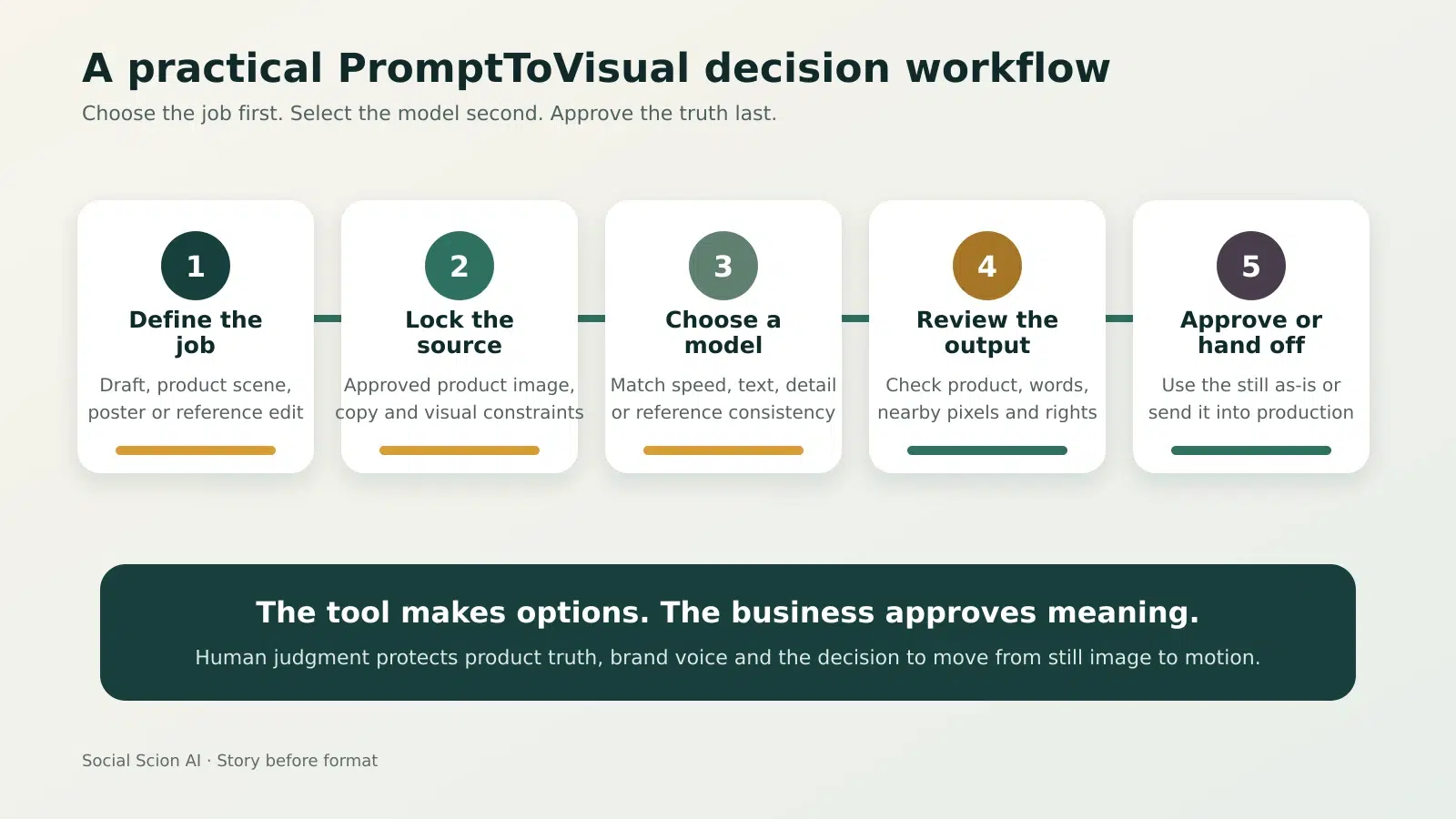
Figure 1. A five-step workflow for turning model choice into an approved campaign asset.
Pricing and credit reality
Pricing checked Sep 30, 2026. PromptToVisual lists a free plan with four one-time trial credits valid for 30 days. Creator is listed at $29 per month with 400 credits. Pro is listed at $79 per month with 1,400 credits and one-month credit rollover. Annual billing is presented as two months free while credits are released monthly.
|
Plan |
Price |
Credits |
Decision note |
|---|---|---|---|
|
Free |
$0 |
4 once |
Use it to inspect the workflow. The official page says up to two successful images. |
|
Creator |
$29/month |
400/month |
Best first paid tier for a recurring small-team still-image workflow. |
|
Pro |
$79/month |
1,400/month |
For higher volume; official pricing lists one-month credit rollover. |
What stands out and what to watch
|
What stands out |
What to watch |
|---|---|
|
Eight documented models organized by image job. |
No verified motion generation; AI Video is marked Soon. |
|
Public per-image credit costs before generation. |
The same brief can require several attempts before approval. |
|
Text-to-image plus reference-photo editing in one workspace. |
Poster edits are flat images, not editable text layers. |
|
Official examples disclose when a sample came from another service. |
Exact typography and unchanged surrounding pixels are not guaranteed. |
|
Free tools for stitching, cropping and other image utilities. |
Commercial workflow language still requires a project-specific terms check. |
Who should use it and who should skip it
Use PromptToVisual if
- You create campaign stills, product concepts, posters or reference-led image variations.
- You value choosing among several models without managing separate image tools.
- You can define a source of truth and run a consistent approval checklist.
- You are comfortable handing approved stills into a separate design or video workflow.
Skip PromptToVisual if
- You need editable typography and exact native design layers after an AI edit.
- You need a verified end-to-end animation or video generation platform today.
- You cannot review product fidelity, copy, licensing and brand fit before publishing.
- You expect every model run to produce a publishable asset without iteration.
A practical small-business test
A Toronto skincare brand needs three campaign stills from one approved amber serum bottle. The goal is not to make the bottle look different. It is to place the real product inside three story contexts while protecting label shape, color and mood.
- Choose one approved source image and write five non-negotiable product details.
- Run a low-cost concept model to test composition and lighting.
- Use a reference-led model only after the visual direction is chosen.
- Check product shape, label area, words, hands, reflections and background at full size.
- Record credits spent and approve only the images that pass the checklist.
- Add exact campaign copy in a native design tool, then decide whether any still should move into motion.
This keeps the owner or brand lead as the source of truth. AI expands the visual canvas. Human judgment decides what the customer is allowed to believe.
Frequently asked questions
Is PromptToVisual an ai image generator?
Yes. Its official homepage describes an AI image generator and photo editor with eight listed image models in one studio.
Can PromptToVisual edit an existing photo?
Yes. The site supports reference-photo editing with JPG, PNG or WEBP input up to 5 MB. Model availability and credit cost depend on the edit.
Does PromptToVisual have a free plan?
Yes. The official pricing page lists four one-time trial credits valid for 30 days, with free-access limits.
How much does PromptToVisual cost?
The official page lists Creator at $29 per month for 400 credits and Pro at $79 per month for 1,400 credits. Pricing can change, so recheck before purchase.
Can it edit poster text perfectly?
No guarantee is stated. The official editor example says the text change worked, but typography and nearby pixels also changed.
Does PromptToVisual create video?
Not as a verified current product capability. The navigation labels AI Video as Soon, and the homepage says its displayed Seedance example was created elsewhere.
What is the best business use case?
A bounded still-image job with an approved source, clear review criteria and a defined handoff, such as product concepts, campaign stills or poster exploration.
Social Scion stance
PromptToVisual is most useful when model choice follows the story job. The studio can make the option space larger. It cannot decide which product detail, customer tension or proof point must remain true. Story comes before format, and approval comes before scale.
Want to see what your business looks like when the right story is found first? Get your Free Film.
Methodology and sources
This evidence-based review uses the approved AIOS Tool Queue brief and current official PromptToVisual product, pricing and editor pages. No hands-on test is claimed. No relevant There’s An AI For That listing or user-review evidence was found in the bounded check.
PromptToVisual official product page | Official pricing and credits | Official poster text editor guidance
AI video creation tools workflow | Smallest useful AI video stack
See what your business looks like when the right story is found first. Get your Free Film


0 conversations