A practical, privacy-aware system for turning recurring client questions into a reusable library of clear educational videos.
A useful accounting video starts with a real client question, then adds evidence, boundaries, and review.
|
Key Takeaways |
|---|
|
The opportunity is already inside the firm
Most accounting practices do not lack subject-matter expertise. They lack a repeatable way to make that expertise visible before a prospect calls. The raw material already exists in recurring explanations: what a new client should gather, why a workflow has several stages, what changed in a rule or requirement, and when a general answer is no longer enough.
Video marketing for accounting firms is the practice of turning those recurring questions into clear, searchable educational videos that show how the firm thinks. The most useful program is not built around becoming a creator. It is built around helping the right client understand a decision, prepare for a process, or recognize when a private conversation is appropriate.
That distinction matters in a trust-sensitive category. A strong video gives a viewer a better question to ask. It does not expose a client record, promise an outcome, or compress a fact-specific judgment into a universal rule.
Why recurring questions outperform a generic content calendar
A generic calendar begins with publishing slots. A useful accounting video program begins with demand. Which questions appear repeatedly in discovery calls? Which explanations reduce anxiety before onboarding? Which misunderstandings slow document collection or create avoidable back-and-forth? Those questions are signals of real client friction.
CountingWorks PRO recommends starting with what professionals already explain each week and narrowing each video to one question. That approach is practical because it connects the content to existing expertise, specific search intent, and a clear client job. It also gives each asset a defined purpose: establish expertise, support a service page, answer a high-intent query, or prepare a client for a process.
The production standard can stay simple. Clear audio, calm delivery, accurate language, and a useful answer usually matter more than elaborate staging. The strategic standard, however, should be high. Every video needs a source, a boundary, and an owner for approval.
The Four Question Video Framework
The four types below cover a large share of the questions an accounting firm can safely turn into educational media. They also make editorial planning easier because the team can decide what evidence and review path each topic needs before anyone writes a script.
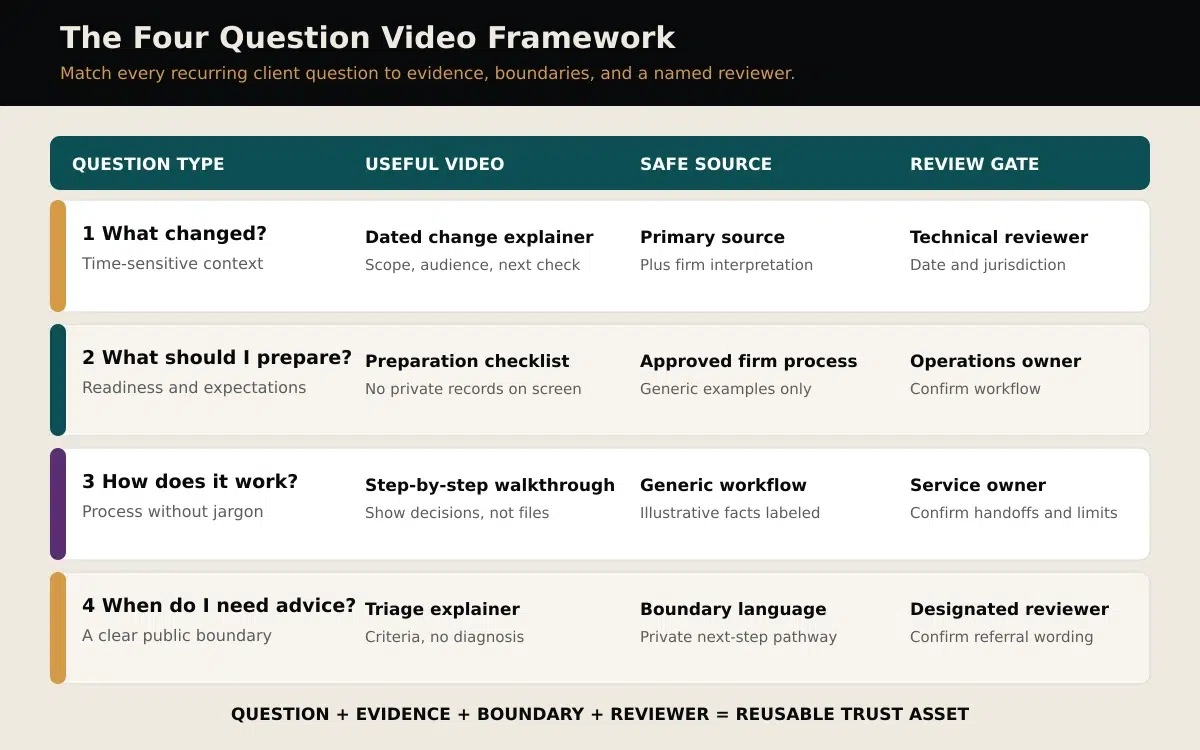
Figure 1. The Four Question Video Framework connects each topic to evidence, boundaries, and a named reviewer.
1 What changed
Use this type for a verified change that affects a defined audience. The video should state what changed, who may be affected, what remains uncertain, and where the viewer can find the primary source. It should also include a clear date and jurisdiction when either could alter the answer.
The temptation is to turn every update into urgent content. Resist it. If the firm cannot verify the change from an authoritative source or obtain timely technical review, use an evergreen explanation instead. A calm baseline guide is more trustworthy than manufactured urgency.
2 What should I prepare
Preparation videos reduce uncertainty before a meeting or workflow begins. They can explain categories of information to gather, questions to consider, or the order in which a process usually unfolds. The viewer should leave knowing how to arrive ready, not believing that a generic checklist is a substitute for the firm’s instructions.
Keep real client records off camera. Use neutral props, blank screens, or invented examples. If a checklist changes by service line or jurisdiction, say so and route the final script to the operations owner who knows the actual handoffs.
3 How does the process work
Process videos make an invisible service easier to understand. They can show the stages of onboarding, explain why review takes time, or clarify what happens after documents arrive. The goal is not to reveal internal controls in unnecessary detail. It is to make expectations, responsibilities, and decision points visible.
A diagram, simple animation, or camera-optional narrated sequence can work well here. The professional owns the explanation and signs off on the sequence. AI can help with drafting, captioning, versioning, and production, but the firm’s judgment remains the source of truth.
4 When do I need tailored advice
Some of the most valuable public videos explain the boundary between education and advice. They identify general signals that a person’s situation may need a private review, then direct the viewer to an appropriate next step. This is not a teaser designed to withhold useful information. It is a responsible way to show where facts, jurisdiction, timing, or individual circumstances change the answer.
Use approved boundary language. Avoid diagnosing a viewer’s situation from the outside. The video can explain the questions a professional would ask without pretending to answer them for someone the firm has never met.
The source and review matrix
A topic is not ready for production when the title sounds promising. It is ready when the team can name the evidence, the public-information boundary, and the reviewer who will approve it.
|
Question type |
Best public asset |
Evidence base |
Required review |
|---|---|---|---|
|
What changed |
Dated explainer |
Primary source plus dated firm interpretation |
Technical reviewer and jurisdiction check |
|
What to prepare |
Preparation checklist |
Approved firm process with generic examples |
Operations or service owner |
|
How it works |
Step-by-step walkthrough |
Generic workflow and labeled illustrative facts |
Service owner and privacy check |
|
When advice is needed |
Boundary or triage explainer |
Approved general criteria and next-step pathway |
Designated professional reviewer |
Myth correction: more tips do not automatically create more trust
A frequent posting schedule can create activity without creating clarity. Ten disconnected tax tips may be less useful than four well-sourced explanations that answer the questions a firm’s ideal clients actually ask.
Trust grows when viewers can see a consistent reasoning pattern: the firm defines the question, explains what evidence matters, states the limit of a general answer, and shows the next sensible step. Production polish supports that pattern, but it cannot replace it. The approval system is part of the product.
A seven-step workflow for a reusable answer library
- Collect recurring questions for two weeks. Ask partners, managers, client-service staff, and business-development staff to capture the exact language clients use.
- Classify each question. Place it under what changed, what to prepare, how the process works, or when tailored advice is needed.
- Choose one job for the video. Decide whether it should educate a prospect, prepare a client, support a service page, or improve a handoff.
- Build an evidence packet. Add the approved firm process, relevant primary sources, and the date or jurisdiction limits that could change the answer.
- Write for one listener. Use plain language, one central question, and a clear boundary. Remove jargon that would not appear in a good client conversation.
- Run privacy and professional review. Strip client identifiers, confirm that examples are invented or properly authorized, and obtain the named reviewer’s approval before production.
- Publish once and distribute deliberately. Embed the full answer on a relevant service page, create a short clip, add a written summary, and track qualified responses.
A practical example for a GTA accounting practice
Imagine a GTA accounting practice repeatedly receives late year-end packages. Instead of publishing another broad reminder, the firm creates a video called “What should a small business owner prepare before year-end review?” The video uses an invented example that is clearly labeled: a fictional company with $480,000 in annual revenue and four general document categories. Those numbers are illustrative, not drawn from any client record.
The script explains why each category matters, which items often require follow-up, and when a business owner should ask for tailored instructions. A service manager confirms the workflow. A designated professional reviews any technical language. The final video shows blank folders and a simple checklist, never a tax form or private file.
That single approved explanation can support the year-end service page, a client email, a short social clip, and an onboarding FAQ. The team has not created four separate ideas. It has created one accurate trust asset and adapted it to the places where clients need it.
Choose the format after the question
Format should follow the communication job. Do not begin with a tool or avatar and search for a reason to use it.
|
Format |
Best use |
Production note |
|---|---|---|
|
30 to 90 second answer |
One preparation point or one boundary |
Captions, calm delivery, one idea |
|
Three to six minute explainer |
A process or decision with several steps |
Use chapter-like structure and a dated source list |
|
Simple animation |
Abstract workflows or camera-sensitive topics |
Keep people, judgment, and reviewer ownership visible |
|
Conversation or webinar extract |
Expert discussion already recorded |
Review the clip in full and preserve context |
Approval checklist before production
- The title answers a real client question in plain language.
- The script has one job and one defined audience.
- Claims are tied to an approved source or verified firm process.
- Dates, jurisdictions, and conditions are stated where they change the answer.
- No private client information appears in the script, visuals, files, or screen recordings.
- Illustrative facts are clearly labeled and cannot be mistaken for a client case.
- The boundary between general education and tailored advice is clear.
- The named reviewer has approved the final script and final cut.
- The team has a reuse plan for the website, email, and appropriate social channels.
- The success measure is qualified attention or a better client interaction, not views alone.
How to measure whether the library works
View count is context, not the verdict. An accounting firm needs the right viewers to find the right explanation at the right moment. Track which videos appear in qualified journeys: service-page visits, consultation requests, email replies, and questions prospects mention on calls.
Also measure operational value. Does a preparation video reduce repeated explanations? Does a process walkthrough improve document readiness? Does a boundary video help prospects recognize when to request a private review? A modest audience can create meaningful value when the asset improves trust or removes friction in a high-consideration decision.
Common mistakes to avoid
- Chasing breaking news without a primary source or timely reviewer.
- Trying to cover an entire technical subject in one video.
- Reading formal copy that sounds nothing like a good client conversation.
- Displaying real documents, dashboards, inboxes, or client details as visual texture.
- Using AI output as authority instead of treating it as production support.
- Publishing a clip without checking whether the edit changed the meaning.
- Measuring reach while ignoring consultation quality and workflow impact.
Frequently asked questions
What should an accounting firm’s first video be about
Choose one question the team answered several times in the past month. Prefer a stable, evergreen topic with a clear service connection and a straightforward approval path. A preparation or process question is often easier to start with than a time-sensitive technical update.
How long should an accounting video be
Use the shortest length that answers the question responsibly. A single preparation point may take 45 seconds. A multi-step process may need several minutes. Do not remove conditions or boundaries simply to hit a platform trend.
Can an accounting firm use AI video
Yes, when the firm treats AI as a production layer rather than a source of professional judgment. AI can help draft versions, create captions, generate camera-optional visuals, and adapt approved material. A qualified human still owns the facts, examples, disclosures, and final approval.
How can a firm protect client privacy in video
Do not show real client records, inboxes, dashboards, or identifiable examples. Build visuals from blank props, generic workflows, and clearly labeled invented facts. Review both the script and the final cut because private information can appear in backgrounds, screen captures, filenames, or captions.
Should every video include a disclaimer
The right language depends on the topic, jurisdiction, and the firm’s policies. A general educational boundary can be useful, but it is not a substitute for professional review. Ask the designated reviewer what wording and recordkeeping process apply before publishing.
How often should an accounting firm publish
Choose a cadence the firm can sustain without weakening review. A smaller library of accurate, specific answers is more valuable than a high-volume feed of generic tips. Consistency means maintaining the standard as well as the schedule.
The Social Scion point of view
The most credible accounting videos do not turn the professional into a performer or place technology at centre stage. They make human judgment easier to see. The firm’s approved expertise leads. Story structure makes the explanation memorable. AI production can work backstage to create camera-optional versions, captions, and channel adaptations without replacing the person accountable for the answer.
If your firm has expertise worth making visible, start with one approved client question and turn it into a human-led story system. Get your Free Film.



0 conversations