Seven source control checks for SaaS and IT teams
Independent editorial analysis based on official ADPulse pages. No hands-on testing or campaign outcome verification is claimed.
One verified product source can support distinct audience angles, but only when the source truth remains visible through review.
Key takeaways
- ADPulse is positioned for SaaS teams that want to turn a product website into audience-specific ad copy, static images, carousel assets, and short-form video scripts.
- Its strongest operational idea is a shared product context that feeds audience segments and creative formats. That can reduce message drift, but only if the imported claims are checked first.
- The official pricing page lists a Free plan with one project and two creatives per day, and a Pro plan at $1.99 per month with up to ten projects and ten creatives per day per project.
- Publishing support needs a careful reading. ADPulse describes social publishing broadly, while its connector page says it is starting with LinkedIn and expanding to other channels.
- Performance insights are a feedback mechanism, not proof that the product improves return on ad spend. No independent outcome evidence was found for this review.
The decision behind the tool
A product visual ad generator can save time only when it scales the right source material. For a SaaS or IT offer, that source includes approved product claims, current feature limits, supported integrations, brand assets, audience jobs, and proof that a reviewer can defend. If the source is stale, a fast generator simply repeats the error in more formats.
ADPulse Studio addresses this problem by importing a product website, organizing product context, creating audience segments, and generating assets from that shared record. The approach is relevant to teams that market one technical product to several buyers. A founder may care about speed and budget, an operations lead may care about implementation, and a marketer may care about usable formats. The product truth should remain stable even when the angle changes.
Direct answer: ADPulse appears useful as an evidence-based starting point for segmented SaaS ad production, especially when a small team wants a repeatable path from website context to creative variants. It should not be treated as an autonomous proof engine. A human still needs to verify extracted claims, review audience assumptions, inspect each visual and call to action, and confirm connector and analytics scope before publishing.
What a product visual ad generator does in ADPulse
On its official site, ADPulse presents a workflow of importing a product URL, mapping audiences, creating ads, and publishing or learning from performance data. The product context feature extracts product descriptions, images, and brand colours into an editable record. Audience Analysis uses that context to suggest segments, pain points, motivations, and positioning. The AI Ad Generator then produces copy, static images, carousel-style assets, and short-form video scripts that can be reviewed and rated.
That sequence matters. Generic ad generators often begin with a prompt and leave the user to restate product facts in every session. A context-first product can reduce that repeated briefing burden. It can also create a new governance problem: once a source record becomes canonical, an incorrect claim can travel into every segment and format. The rest of this review focuses on the controls that make the workflow safer.
1 Confirm what the URL import captured
The Product Context page says ADPulse can scan a product website after signup and extract product details, descriptions, images, and brand colours. Treat that imported record as a draft, not as approved truth. Compare it with the current pricing page, documentation, release notes, and any internal claim library. Delete old benefits, qualify broad statements, and identify which claims require proof. This first check determines whether later speed is useful or risky.
2 Separate product facts from positioning language
A landing page often blends factual capability with persuasive language. A feature such as website import is verifiable. A phrase such as better performance is an aspiration unless supported by campaign evidence. Store the capability, limit, source URL, and check date separately from the marketing interpretation. For a technical service, do the same with supported platforms, service levels, security claims, and delivery timelines.
3 Make audience segments meaningfully different
The Audience Analysis page says ADPulse creates editable segments based on product context, including motivations and pain points. The useful test is not whether two segment names exist. It is whether each segment has a distinct buying job and objection. For example, an IT operations lead may need deployment clarity and reliability proof, while a growth lead may need channel fit and production throughput. If both ads use the same headline with a different label, segmentation has not changed the decision logic.
4 Match the format to the claim
The AI Ad Generator page lists copy, static images, carousel-style assets, and short-form video scripts. A script is not a finished video, and a carousel is not automatically suited to every platform. Choose a format because it can carry the required proof. A carousel can unpack a process. A static visual can clarify one benefit. A short-form script can sequence problem, evidence, and next action. Do not let format novelty outrank the customer question.
5 Put human review before visual scale
ADPulse describes style, tone, brand palette, review, rating, and publishing controls. Use those controls as a mandatory gate. Review the claim, the image implication, the audience assumption, and the call to action together. A visual can overstate a modest feature even when the copy is technically accurate. For example, an image that implies one-click multichannel deployment could mislead if a connector is not yet supported.
6 Verify publishing scope by platform
The Social Publishing page describes formatting, scheduling, previews, dispatch status, and error tracking. It also says direct connector support is starting with LinkedIn and expanding to additional channels. That nuance should shape adoption. A team that mainly publishes on LinkedIn may be able to use more of the native workflow. A team built around Meta or TikTok should confirm the current connector status and be ready to export assets or use another publishing step.
7 Read insights as signals, not outcomes
The Performance Insights page says ADPulse can collect impressions, clicks, and interactions from connected platforms, compare assets and segments, and feed ratings or learnings back into future generation. That can support a useful feedback loop. It does not establish that ADPulse improves conversion, customer acquisition cost, or return on ad spend. Those outcomes depend on targeting, offer, media spend, attribution, landing pages, sales follow-up, and sample size. Use the data to form the next controlled test, not to manufacture certainty.
ADPulse pricing checked October 2 2026
The following details were verified on the official pricing page on October 2, 2026. Pricing and limits can change, so recheck before purchase.
|
Plan |
Price |
Published limits |
Best fit |
|---|---|---|---|
|
Free |
$0 forever |
1 project; 2 creatives per day per project; website import after signup; core workflow |
A focused evaluation with one product and low daily volume |
|
Pro |
$1.99 per month |
Up to 10 projects; 10 creatives per day per project; content queue up to 10; re-scan; priority email support |
Small teams testing several products or audience paths |
The pricing FAQ says each generated asset counts toward the daily limit, including single generation, queue, bulk, and playbook output. Daily limits reset at midnight UTC. The page also says there are no credit packs or seat markups. These are official product terms, not independently tested billing behaviour.
Practical strengths and limits
|
Potential strength |
What still needs human control |
|---|---|
|
A shared product context can reduce repeated briefing. |
Imported claims can be stale, incomplete, or too promotional. |
|
Editable audience segments support different buying jobs. |
Generated pain points may be plausible but unverified. |
|
Several creative formats can come from one source. |
A video script is not a finished video, and every format needs review. |
|
Publishing status and previews can centralize operations. |
Current connector availability must be confirmed by platform. |
|
Asset and segment signals can guide iteration. |
First-party product analytics do not prove campaign outcomes. |
Who should use ADPulse and who should skip it
Use ADPulse when you have a current product page, a small number of clearly defined audiences, an internal reviewer who understands the offer, and a need to create several controlled variants without rebuilding context every time. It is especially relevant when the same product must speak differently to technical, operational, and growth buyers.
Skip or delay it when the website is not the approved source of truth, pricing and feature claims change frequently without documentation, regulated claims need formal review, or the team expects the tool to provide independent performance proof. It is also a weak fit when the main requirement is finished cinematic video rather than scripts and visual ad assets.
A source controlled two segment workflow
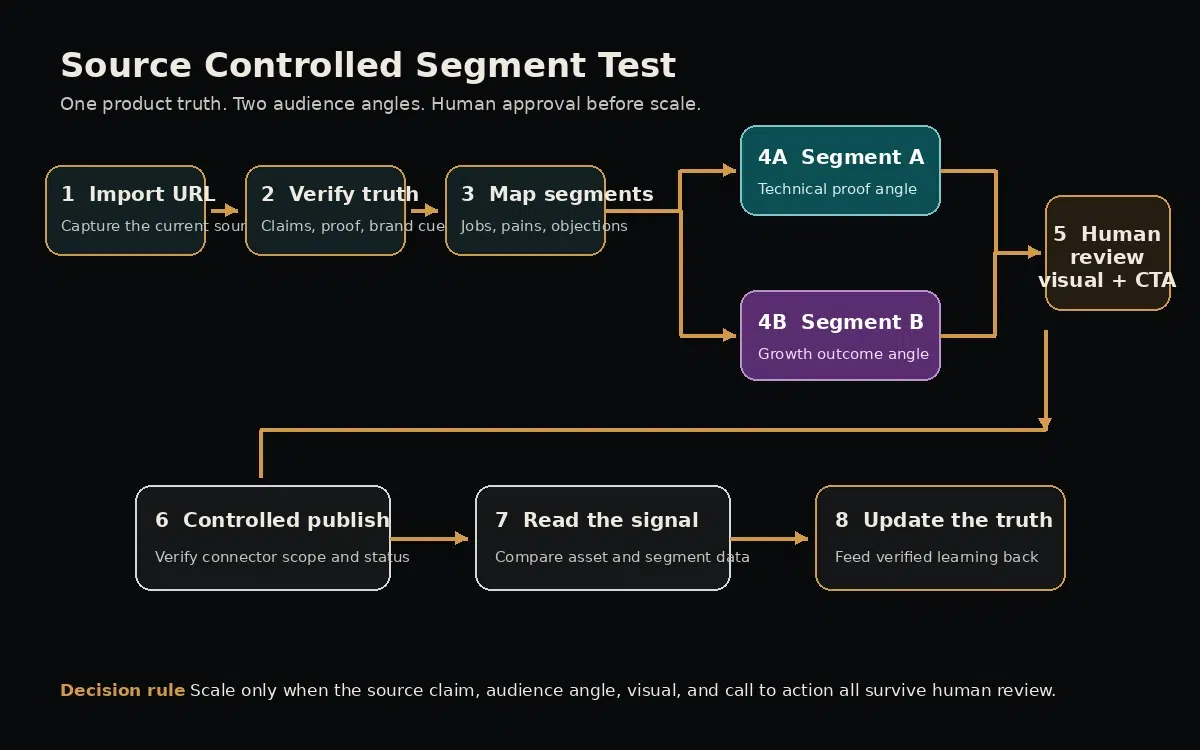
A practical decision path for keeping product truth stable while audience framing changes.
- Import one approved URL. Record the scan date and keep the source page link beside every important claim.
- Verify claims and proof. Mark each item as factual capability, limit, customer evidence, or positioning language.
- Choose two segments with different jobs. For an IT service, one might prioritize operational risk while another prioritizes growth throughput.
- Write one angle per segment. Keep the underlying product fact identical and change only the customer consequence and proof order.
- Review the visual and call to action. Confirm that the image does not imply a feature or outcome the copy cannot support.
- Publish as a controlled test. Keep audience, format, offer, and measurement window explicit enough to interpret.
- Feed verified learning back into the product context. Do not turn a weak early signal into a permanent claim.
This workflow follows a Social Scion principle: human intelligence leads and AI expands production capability. The tool can assemble variants, but a person must decide which business truth matters, which customer question comes next, and what evidence is strong enough to publish.
Related Social Scion guides: How to select an AI video ad generator; How to run controlled AI video ad tests; and Humanized storytelling for business visibility.
Frequently asked questions about a product visual ad generator
Is ADPulse a product visual ad generator for SaaS teams?
Yes. Its official positioning and workflow are built around importing a SaaS product website, creating audience segments, and generating visual ad assets and copy. Suitability still depends on source quality, required platforms, and review controls.
Does ADPulse generate finished videos?
The AI Ad Generator page lists short-form video scripts. That is different from a finished rendered video. Confirm the current product scope if video production is a deciding requirement.
Can ADPulse publish to every social network?
The site discusses multiple social formats, but the Social Publishing page says direct connector support is starting with LinkedIn and expanding. Verify the live connector list before relying on native publishing for another platform.
How much does ADPulse cost?
The official pricing page checked October 2, 2026 lists Free at $0 and Pro at $1.99 per month. Free includes one project and two creatives per day. Pro lists up to ten projects and ten creatives per day per project.
Does the URL import make claims accurate?
No. It can make the source consistent, but consistency is not accuracy. A reviewer should compare imported claims with current documentation and approved proof before generating ads.
Are ADPulse performance insights proof of return on ad spend?
No. The feature can organize impressions, clicks, interactions, asset comparisons, and segment signals from connected platforms. Business outcomes require broader attribution and independent campaign analysis.
What is the safest first test?
Use one current product URL, two genuinely different audience jobs, one claim you can verify, and one format. Review the visual and call to action before publishing, then use the result to design the next controlled test.
Methodology and evidence boundary
This review was researched from the official ADPulse homepage, pricing page, demo, Product Context, Audience Analysis, AI Ad Generator, Social Publishing, and Performance Insights pages on October 2, 2026. The demo is first-party and was used to understand the interface narrative, not to validate performance. No hands-on account, billing, generation, publishing, connector, or analytics test was performed. No independent campaign outcomes were found and none are claimed.
Social Scion perspective
ADPulse has a useful strategic shape: establish product context, interpret audiences, create variants, publish carefully, and learn. The value is not simply more content. It is the possibility of preserving one business-owned truth while expressing it for different buyers. That possibility becomes real only when a human checks the source, separates evidence from aspiration, and keeps the audience angle honest.
For a small SaaS or IT team, the adoption question is therefore simple. Do you have an approved product truth and a reviewer who can protect it? If yes, a context-first generator can reduce briefing work and create a disciplined testing queue. If no, automation will spread uncertainty faster.
Want to see which story your business should build first? Apply for a personalized Free Film. Social Scion uses your business context and Story Gap to demonstrate one focused, camera-optional story opportunity. It is a practical first example, not a promise of guaranteed growth.
Official sources
- ADPulse Studio homepage; Pricing Verified October 2, 2026
- First-party demo; Product Context Verified October 2, 2026
- Audience Analysis; AI Ad Generator Verified October 2, 2026
- Social Publishing; Performance Insights Verified October 2, 2026



0 conversations